This time we’re going bigger than ever. Fabric, Power BI, SQL, AI and more. We're covering it all. You won't want to miss it.
Learn moreLevel up your Power BI skills this month - build one visual each week and tell better stories with data! Get started
Hello all!
I have a doubt regarding Power Query.
I have 2 columns, with duplicates. I want to keep only those that are unique in both. For instance:
If I remove duplicates from column1, I only want to remove if they stay unique in column2.
I.e, if I remove row 1 I can't remove row 3 otherwise I would have two "11".
I hope my explanation made sense.
Thanks in advance.
Solved! Go to Solution.
Use below Query to achieve this output
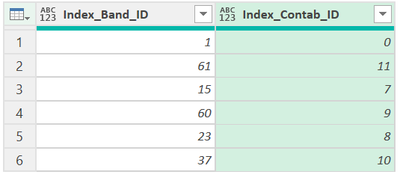
let
Source = Excel.CurrentWorkbook(){[Name="Table1"]}[Content],
#"Added Index" = Table.AddIndexColumn(Source, "Index", 0, 1, Int64.Type),
#"Inserted Modulo" = Table.AddColumn(#"Added Index", "Modulo", each Number.Mod([Index], 4), type number),
#"Filtered Rows" = Table.SelectRows(#"Inserted Modulo", each ([Modulo] = 0 or [Modulo] = 3)),
#"Removed Columns" = Table.RemoveColumns(#"Filtered Rows",{"Index", "Modulo"})
in
#"Removed Columns"
To achieve the below output, replace [Modulo] = 0 or [Modulo] = 3 in 5th row of the code above
with [Modulo] = 1 or [Modulo] = 2
Updated code is below
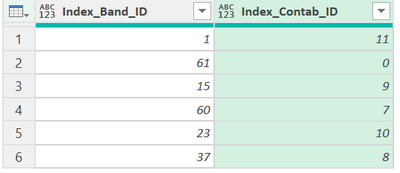
let
Source = Excel.CurrentWorkbook(){[Name="Table1"]}[Content],
#"Added Index" = Table.AddIndexColumn(Source, "Index", 0, 1, Int64.Type),
#"Inserted Modulo" = Table.AddColumn(#"Added Index", "Modulo", each Number.Mod([Index], 4), type number),
#"Filtered Rows" = Table.SelectRows(#"Inserted Modulo", each [Modulo] = 1 or [Modulo] = 2),
#"Removed Columns" = Table.RemoveColumns(#"Filtered Rows",{"Index", "Modulo"})
in
#"Removed Columns"
Use below Query to achieve this output
let
Source = Excel.CurrentWorkbook(){[Name="Table1"]}[Content],
#"Added Index" = Table.AddIndexColumn(Source, "Index", 0, 1, Int64.Type),
#"Inserted Modulo" = Table.AddColumn(#"Added Index", "Modulo", each Number.Mod([Index], 4), type number),
#"Filtered Rows" = Table.SelectRows(#"Inserted Modulo", each ([Modulo] = 0 or [Modulo] = 3)),
#"Removed Columns" = Table.RemoveColumns(#"Filtered Rows",{"Index", "Modulo"})
in
#"Removed Columns"
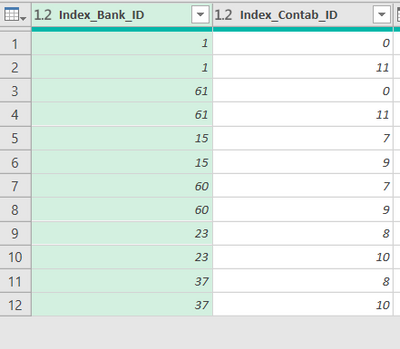
To achieve the below output, replace [Modulo] = 0 or [Modulo] = 3 in 5th row of the code above
with [Modulo] = 1 or [Modulo] = 2
Updated code is below
let
Source = Excel.CurrentWorkbook(){[Name="Table1"]}[Content],
#"Added Index" = Table.AddIndexColumn(Source, "Index", 0, 1, Int64.Type),
#"Inserted Modulo" = Table.AddColumn(#"Added Index", "Modulo", each Number.Mod([Index], 4), type number),
#"Filtered Rows" = Table.SelectRows(#"Inserted Modulo", each [Modulo] = 1 or [Modulo] = 2),
#"Removed Columns" = Table.RemoveColumns(#"Filtered Rows",{"Index", "Modulo"})
in
#"Removed Columns"
That worked, thank you.
Check out the April 2026 Power BI update to learn about new features.
Sign up to receive a private message when registration opens and key events begin.
If you have recently started exploring Fabric, we'd love to hear how it's going. Your feedback can help with product improvements.