cancel
Showing results for 
Search instead for 
Did you mean: 

Join the FabCon + SQLCon recap series. Up next: Power BI, Real-Time Intelligence, IQ and AI, and Data Factory take center stage. All sessions are available on-demand after the live show. Register now

Reply
RappJ
Helper I
Helper I

Comparing dates not working correctly in nested table

Good all,

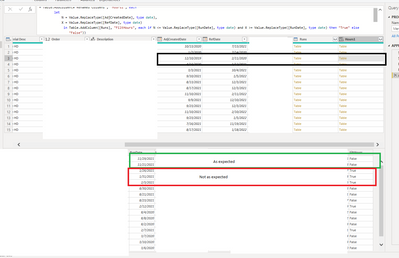
Any idea why this snippit will not work as expected. Note some of the retuened checks are correct and some are not.  I double checked all data types and all three are set to date (MM/DD/YYYY). 
Regards,
Jason


= Table.AddColumn(#"Renamed Columns", "Hours1", each 
        let
            N = Value.ReplaceType([AdjCreatedDate], type date),
            X = Value.ReplaceType([RefDate], type date)
             in Table.AddColumn([Runs], "FiltHours", each if N <= Value.ReplaceType([RunDate], type date) and X >= Value.ReplaceType([RunDate], type date) then "True" else "False"))


RappJ_1-1647035383740.png


3 REPLIES 3
Anonymous
Not applicable

try rhis change...


Table.AddColumn(#"Renamed Columns", "Hours1", each 
        let
            N = Value.ReplaceType([AdjCreatedDate], type date),
            X = Value.ReplaceType([RefDate], type date)
             in Table.AddColumn([Runs], "FiltHours", (r)=> if N <= Value.ReplaceType(r[RunDate], type date) and X >= Value.ReplaceType(r[RunDate], type date) then "True" else "False"))


Rocco,
Thank you for the reply. This code is having the same issue where dates outside the range are still being flagged as true. 
Jason

lbendlin
Super User
Super User

Please provide sanitized sample data that fully covers your issue. If you paste the data into a table in your post or use one of the file services it will be easier to work with. Avoid posting screenshots of your source data if possible.

Please show the expected outcome based on the sample data you provided. Screenshots of the expected outcome are ok.


Helpful resources

Announcements
April Power BI Update Carousel

Power BI Monthly Update - April 2026

Check out the April 2026 Power BI update to learn about new features.

New to Fabric survey Carousel

New to Fabric Survey

If you have recently started exploring Fabric, we'd love to hear how it's going. Your feedback can help with product improvements.

Power BI DataViz World Championships carousel

Power BI DataViz World Championships - June 2026

A new Power BI DataViz World Championship is coming this June! Don't miss out on submitting your entry.

FabCon and SQLCon Highlights Carousel

FabCon &SQLCon Highlights

Experience the highlights from FabCon & SQLCon, available live and on-demand starting April 14th.