Share feedback directly with Fabric product managers, participate in targeted research studies and influence the Fabric roadmap.
Sign up nowGet Fabric certified for FREE! Don't miss your chance! Learn more
Good all,
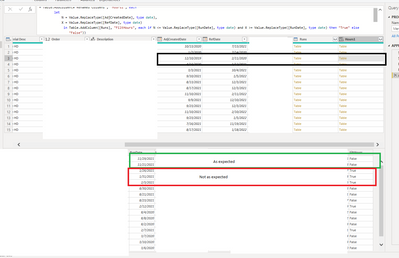
Any idea why this snippit will not work as expected. Note some of the retuened checks are correct and some are not. I double checked all data types and all three are set to date (MM/DD/YYYY).
Regards,
Jason
= Table.AddColumn(#"Renamed Columns", "Hours1", each
let
N = Value.ReplaceType([AdjCreatedDate], type date),
X = Value.ReplaceType([RefDate], type date)
in Table.AddColumn([Runs], "FiltHours", each if N <= Value.ReplaceType([RunDate], type date) and X >= Value.ReplaceType([RunDate], type date) then "True" else "False"))
try rhis change...
Table.AddColumn(#"Renamed Columns", "Hours1", each
let
N = Value.ReplaceType([AdjCreatedDate], type date),
X = Value.ReplaceType([RefDate], type date)
in Table.AddColumn([Runs], "FiltHours", (r)=> if N <= Value.ReplaceType(r[RunDate], type date) and X >= Value.ReplaceType(r[RunDate], type date) then "True" else "False"))
Rocco,
Thank you for the reply. This code is having the same issue where dates outside the range are still being flagged as true.
Jason
Please provide sanitized sample data that fully covers your issue. If you paste the data into a table in your post or use one of the file services it will be easier to work with. Avoid posting screenshots of your source data if possible.
Please show the expected outcome based on the sample data you provided. Screenshots of the expected outcome are ok.
Share feedback directly with Fabric product managers, participate in targeted research studies and influence the Fabric roadmap.
If you love stickers, then you will definitely want to check out our Community Sticker Challenge!
Check out the January 2026 Power BI update to learn about new features.
| User | Count |
|---|---|
| 12 | |
| 11 | |
| 11 | |
| 7 | |
| 6 |