

cancel
Showing results for 
Search instead for 
Did you mean: 

Try your skills in the Power BI Dataviz World Championship! Round one ends June 26. Join now

Reply
IAM
Helper III
Helper III

Power Query: Duplicate rows with multiple names

Hello,


Is it somehow possible to do the following in Power Bi Query:


When I have a project, with different people, can I extract it to multiple lines?


So for example:

NamesProjectDateHours
David, RichardProject X14-jul16


When I work with these names on an x-axis I will see 'David, Richard' as one name, but I want one line

of 8 hours for David and one line of 8 hours for Richard.


Names are always comma separated.


Is it possible to make two rows from this when I load the Excel file in Power BI?

1 ACCEPTED SOLUTION
KT_Bsmart2gethe
Impactful Individual

Hi @IAM ,


See below outcome:

KT_Bsmart2gethe_0-1657802871523.png


Simple 3 transformation steps:

1. Add a custom column and add formula below to split the name by ", " and return as a list:

Text.Split([Names],", ")


2. Expand the list to new rows

KT_Bsmart2gethe_2-1657803063696.png


3. Add a custom column to split the hour equally with formula below:

[Hours]/List.Count(Text.Split([Names],", "))


Regards

KT


View solution in original post

3 REPLIES 3
IAM
Helper III
Helper III

Woww thanks!!!


ronrsnfld
Super User
Super User

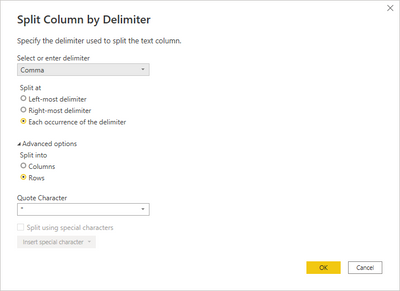
  • Right-click on the column
  • Split column => by delimiter
  • Select "comma", "advanced", "rows"

ronrsnfld_0-1657817575046.png


KT_Bsmart2gethe
Impactful Individual

Hi @IAM ,


See below outcome:

KT_Bsmart2gethe_0-1657802871523.png


Simple 3 transformation steps:

1. Add a custom column and add formula below to split the name by ", " and return as a list:

Text.Split([Names],", ")


2. Expand the list to new rows

KT_Bsmart2gethe_2-1657803063696.png


3. Add a custom column to split the hour equally with formula below:

[Hours]/List.Count(Text.Split([Names],", "))


Regards

KT


Helpful resources

Announcements
Fabric Data Days is here Carousel

Fabric Data Days 2026

Don't miss out on Data Days, June 15 through August 7. Learn Fabric, Power BI, SQL, AI and more.

Power BI DataViz World Championships carousel

Power BI DataViz World Championships - June 2026

A new Power BI DataViz World Championship is coming this June! Don't miss out on submitting your entry.