cancel
Showing results for 
Search instead for 
Did you mean: 

July 7 - July 17 | Round 2 of the Power BI Dataviz World Championships. Don't miss your chance! Learn more

Reply
Anonymous
Not applicable

Power Platform Dataflow Timeout or Error

I am using the new Power Platform Dataflow connector announced in August 2021 release.  I am using the connector in a dataflow to reference another dataflow.  All dataflows are in Premium Gen2 with Enhance Computed on.


I can create a simple dataflow with a small table and it works fine.  I then try to add a second table with 20 million rows.  That times out after 10 minutes during validation (see image).  I can still save the dataflow without validation and then I am able to refresh it successfully.
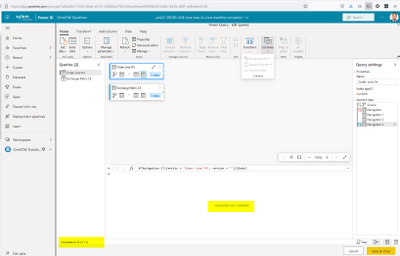
 

mweschenburg_0-1631479374124.png


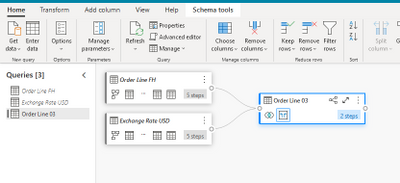
However, I am unable to do any additional dataflow transformations because the large table is not validated.  If I let the dataflow creator window timeout and then use the advanced editor to add a merge trahsformation, I can save the dataflow (see below digram).  But when I try to refresh the dataflow, it fails with following error.


Error: DataSource.MissingClientLibrary: ADO.NET: Unable to find the requested .Net Framework Data Provider.  It may not be installed. DataSourceKind = PowerPlatformDataflows DataSourcePath = PowerPlatformDataflows. RootActivityId = df7c1fa9-5510-4383-96f4-9c5fd2b9f1d6.Param1 = DataSource.MissingClientLibrary: ADO.NET: Unable to find the requested .Net Framework Data Provider.  It may not be installed. DataSourceKind = PowerPlatformDataflows DataSourcePath = PowerPlatformDataflows Request ID: ccb5aa98-c69e-5e5a-077f-615dddfe0f65.


mweschenburg_1-1631479374134.png


I suspect all the above behaviors are related but cannot figure out what is wrong or how to fix.

3 REPLIES 3
interimUser
Advocate I
Advocate I

Hello, I'm having a similar problem, did you get a fix from MS?

ADO library not available.


Thanks

Anonymous
Not applicable

Microsoft notified me last week that a fix was released on 30-Sep or 1-Oct.  This fixed the timeouts I was experiencing.  It did not fix the ADO library not available error.  I reported that back to Microsoft yesterday and they are investigating.  You probably can't tack onto my support ticket, but heres my Microsoft ticket number that might help as a reference should you contact Microsofy yourself.


RE: 2109130040007301 - Microsoft Power BI Support TrackingID#03584600215


lbendlin
Super User
Super User

I don't think this is an issue with your process.  The new dataflows are rather half baked currently. If you have a Pro license you should consider raising a Pro ticket at https://powerbi.microsoft.com/en-us/support/pro/

Helpful resources

Announcements
FabCon and SQLCon Barcelona 2026

FabCon & SQLCon – Barcelona 2026

Join us in Barcelona for FabCon and SQLCon, the Fabric, Power BI, SQL, and AI community event. Save €200 with code FABCMTY200.

60 days of Data Days Carousel

Data Days 2026

Join Data Days 2026: 60 days of free live/on-demand sessions, challenges, study groups, and certification opportunities.

Power BI DataViz World Championships carousel

Power BI DataViz World Championships - June 2026

A new Power BI DataViz World Championship is coming this June! Don't miss out on submitting your entry.

Top Solution Authors