Don't miss your chance to take the Fabric Data Engineer (DP-700) exam on us!
Learn moreWe've captured the moments from FabCon & SQLCon that everyone is talking about, and we are bringing them to the community, live and on-demand. Starts on April 14th. Register now
I am using the new Power Platform Dataflow connector announced in August 2021 release. I am using the connector in a dataflow to reference another dataflow. All dataflows are in Premium Gen2 with Enhance Computed on.
I can create a simple dataflow with a small table and it works fine. I then try to add a second table with 20 million rows. That times out after 10 minutes during validation (see image). I can still save the dataflow without validation and then I am able to refresh it successfully.
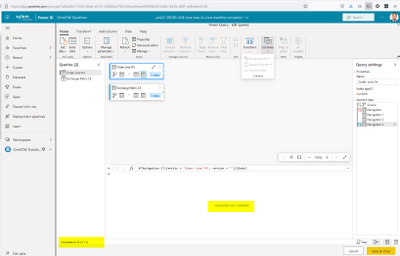
However, I am unable to do any additional dataflow transformations because the large table is not validated. If I let the dataflow creator window timeout and then use the advanced editor to add a merge trahsformation, I can save the dataflow (see below digram). But when I try to refresh the dataflow, it fails with following error.
| Error: DataSource.MissingClientLibrary: ADO.NET: Unable to find the requested .Net Framework Data Provider. It may not be installed. DataSourceKind = PowerPlatformDataflows DataSourcePath = PowerPlatformDataflows. RootActivityId = df7c1fa9-5510-4383-96f4-9c5fd2b9f1d6.Param1 = DataSource.MissingClientLibrary: ADO.NET: Unable to find the requested .Net Framework Data Provider. It may not be installed. DataSourceKind = PowerPlatformDataflows DataSourcePath = PowerPlatformDataflows Request ID: ccb5aa98-c69e-5e5a-077f-615dddfe0f65. |
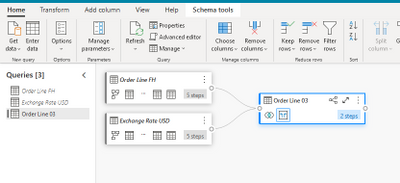
I suspect all the above behaviors are related but cannot figure out what is wrong or how to fix.
Hello, I'm having a similar problem, did you get a fix from MS?
ADO library not available.
Thanks
Microsoft notified me last week that a fix was released on 30-Sep or 1-Oct. This fixed the timeouts I was experiencing. It did not fix the ADO library not available error. I reported that back to Microsoft yesterday and they are investigating. You probably can't tack onto my support ticket, but heres my Microsoft ticket number that might help as a reference should you contact Microsofy yourself.
RE: 2109130040007301 - Microsoft Power BI Support TrackingID#03584600215
I don't think this is an issue with your process. The new dataflows are rather half baked currently. If you have a Pro license you should consider raising a Pro ticket at https://powerbi.microsoft.com/en-us/support/pro/
If you have recently started exploring Fabric, we'd love to hear how it's going. Your feedback can help with product improvements.
A new Power BI DataViz World Championship is coming this June! Don't miss out on submitting your entry.
Share feedback directly with Fabric product managers, participate in targeted research studies and influence the Fabric roadmap.
| User | Count |
|---|---|
| 5 | |
| 3 | |
| 3 | |
| 2 | |
| 2 |
| User | Count |
|---|---|
| 9 | |
| 8 | |
| 7 | |
| 7 | |
| 5 |