Learn from the best! Meet the four finalists headed to the FINALS of the Power BI Dataviz World Championships! Register now
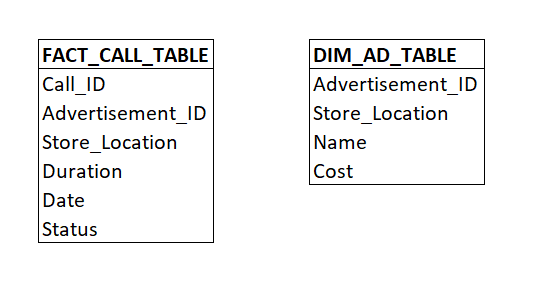
I have a data model which has many to many relationships between several tables. I've provided one example below, where the relationship in the model is FACT_CALL_TABLE.Advertisement_ID to DIM_AD_TABLE.Advertisement_ID. This relationship is many-to-many, however the combinaton of Advertisement_ID & Store_Location makes the relationship many-to-one.
Is it possible for me to join Advertisement_ID and Store_Location to create a unique key between both tables?
Solved! Go to Solution.
Hi @ERing ,
You definely can do this in Power BI.
You need to create a calculated column in both tables. This calculated column should concatenate Advertisement_ID and Store_Location. Now join FACT_CALL_TABLE and DIM_AD_TABLE using this new calculated column.
Below would be your DAX for Calculated column in FACT_CALL_TABLE:
Unique_Key_Fact_Table = CONCATENATE(FACT_CALL_TABLE[Advertisement_ID], FACT_CALL_TABLE[Store_Location])
Below would be your DAX for Calculated column in DIM_AD_TABLE:
Unique_Key_Dim_Table = CONCATENATE(DIM_AD_TABLE [Advertisement_ID], DIM_AD_TABLE [Store_Location])
Now go to model view and join both tables on FACT_CALL_TABLE.Unique_Key_Fact_Table = DIM_AD_TABLE.Unique_Key_Dim_Table
Give a Thumbs Up if this post helped you in any way and Mark This Post as Solution if it solved your query !!! Proud To Be a Super User !!! |
@ERing ,
Yes.
In case you don't want to use CONCATENATE function, you can simply use FACT_CALL_TABLE[Advertisement_ID] & FACT_CALL_TABLE[Store_Location] for concatenating.
Give a Thumbs Up if this post helped you in any way and Mark This Post as Solution if it solved your query !!! Proud To Be a Super User !!! |
Hi @ERing ,
You definely can do this in Power BI.
You need to create a calculated column in both tables. This calculated column should concatenate Advertisement_ID and Store_Location. Now join FACT_CALL_TABLE and DIM_AD_TABLE using this new calculated column.
Below would be your DAX for Calculated column in FACT_CALL_TABLE:
Unique_Key_Fact_Table = CONCATENATE(FACT_CALL_TABLE[Advertisement_ID], FACT_CALL_TABLE[Store_Location])
Below would be your DAX for Calculated column in DIM_AD_TABLE:
Unique_Key_Dim_Table = CONCATENATE(DIM_AD_TABLE [Advertisement_ID], DIM_AD_TABLE [Store_Location])
Now go to model view and join both tables on FACT_CALL_TABLE.Unique_Key_Fact_Table = DIM_AD_TABLE.Unique_Key_Dim_Table
Give a Thumbs Up if this post helped you in any way and Mark This Post as Solution if it solved your query !!! Proud To Be a Super User !!! |
@ERing ,
Yes.
In case you don't want to use CONCATENATE function, you can simply use FACT_CALL_TABLE[Advertisement_ID] & FACT_CALL_TABLE[Store_Location] for concatenating.
Give a Thumbs Up if this post helped you in any way and Mark This Post as Solution if it solved your query !!! Proud To Be a Super User !!! |
A new Power BI DataViz World Championship is coming this June! Don't miss out on submitting your entry.
Share feedback directly with Fabric product managers, participate in targeted research studies and influence the Fabric roadmap.
| User | Count |
|---|---|
| 5 | |
| 4 | |
| 4 | |
| 3 | |
| 2 |
| User | Count |
|---|---|
| 11 | |
| 10 | |
| 8 | |
| 7 | |
| 5 |