Join us at FabCon Atlanta from March 16 - 20, 2026, for the ultimate Fabric, Power BI, AI and SQL community-led event. Save $200 with code FABCOMM.
Register now!Vote for your favorite vizzies from the Power BI Dataviz World Championship submissions. Vote now!
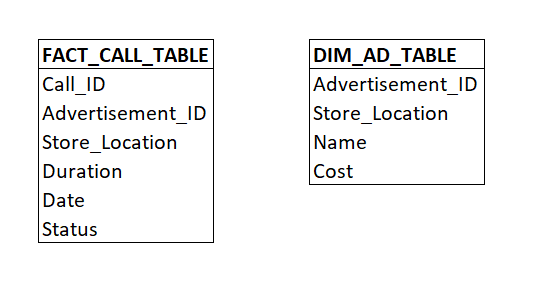
I have a data model which has many to many relationships between several tables. I've provided one example below, where the relationship in the model is FACT_CALL_TABLE.Advertisement_ID to DIM_AD_TABLE.Advertisement_ID. This relationship is many-to-many, however the combinaton of Advertisement_ID & Store_Location makes the relationship many-to-one.
Is it possible for me to join Advertisement_ID and Store_Location to create a unique key between both tables?
Solved! Go to Solution.
Hi @ERing ,
You definely can do this in Power BI.
You need to create a calculated column in both tables. This calculated column should concatenate Advertisement_ID and Store_Location. Now join FACT_CALL_TABLE and DIM_AD_TABLE using this new calculated column.
Below would be your DAX for Calculated column in FACT_CALL_TABLE:
Unique_Key_Fact_Table = CONCATENATE(FACT_CALL_TABLE[Advertisement_ID], FACT_CALL_TABLE[Store_Location])
Below would be your DAX for Calculated column in DIM_AD_TABLE:
Unique_Key_Dim_Table = CONCATENATE(DIM_AD_TABLE [Advertisement_ID], DIM_AD_TABLE [Store_Location])
Now go to model view and join both tables on FACT_CALL_TABLE.Unique_Key_Fact_Table = DIM_AD_TABLE.Unique_Key_Dim_Table
Give a Thumbs Up if this post helped you in any way and Mark This Post as Solution if it solved your query !!! Proud To Be a Super User !!! |
@ERing ,
Yes.
In case you don't want to use CONCATENATE function, you can simply use FACT_CALL_TABLE[Advertisement_ID] & FACT_CALL_TABLE[Store_Location] for concatenating.
Give a Thumbs Up if this post helped you in any way and Mark This Post as Solution if it solved your query !!! Proud To Be a Super User !!! |
Hi @ERing ,
You definely can do this in Power BI.
You need to create a calculated column in both tables. This calculated column should concatenate Advertisement_ID and Store_Location. Now join FACT_CALL_TABLE and DIM_AD_TABLE using this new calculated column.
Below would be your DAX for Calculated column in FACT_CALL_TABLE:
Unique_Key_Fact_Table = CONCATENATE(FACT_CALL_TABLE[Advertisement_ID], FACT_CALL_TABLE[Store_Location])
Below would be your DAX for Calculated column in DIM_AD_TABLE:
Unique_Key_Dim_Table = CONCATENATE(DIM_AD_TABLE [Advertisement_ID], DIM_AD_TABLE [Store_Location])
Now go to model view and join both tables on FACT_CALL_TABLE.Unique_Key_Fact_Table = DIM_AD_TABLE.Unique_Key_Dim_Table
Give a Thumbs Up if this post helped you in any way and Mark This Post as Solution if it solved your query !!! Proud To Be a Super User !!! |
@ERing ,
Yes.
In case you don't want to use CONCATENATE function, you can simply use FACT_CALL_TABLE[Advertisement_ID] & FACT_CALL_TABLE[Store_Location] for concatenating.
Give a Thumbs Up if this post helped you in any way and Mark This Post as Solution if it solved your query !!! Proud To Be a Super User !!! |
Vote for your favorite vizzies from the Power BI World Championship submissions!
If you love stickers, then you will definitely want to check out our Community Sticker Challenge!
Check out the January 2026 Power BI update to learn about new features.
| User | Count |
|---|---|
| 11 | |
| 10 | |
| 6 | |
| 6 | |
| 6 |