

cancel
Showing results for 
Search instead for 
Did you mean: 

Next up in the FabCon + SQLCon recap series: The roadmap for Microsoft SQL and Maximizing Developer experiences in Fabric. All sessions are available on-demand after the live show. Register now

Reply
alt_RG
Frequent Visitor

MongoDB ODBC connector for PowerBI - Incremental refreshes are slow

Hi all,

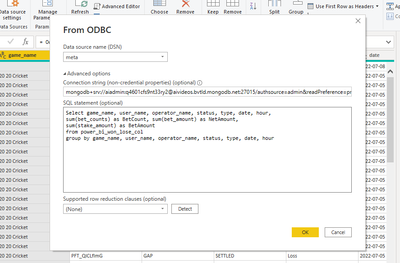
We are using the Mongo DB ODBC connector for PowerBI to connect the MongoDB data source. We have implemented incremental refresh as per our data size is concerned. But after the initial refresh, 20-30K rows are pulled into the report in 11 mins on average. This is not what we are expecting. The refreshes are very slow. 

alt_RG_0-1657730335348.png

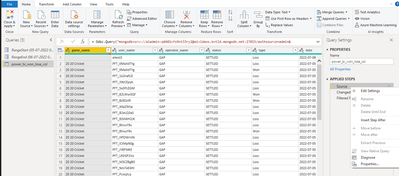
 I think query folding is also not happening in the Power Query at the first step where a simple SQL query is used to fetch the data from MongoDB through the ODBC connector.  Please help! Thanks for your suggestions. 


alt_RG_2-1657730627719.png


alt_RG_1-1657730412234.png

6 REPLIES 6
alt_RG
Frequent Visitor

@lbendlin: I just found something in the Microsoft docs. It says, only the PostgreSQL connector supports query folding. No other connectors support query folding if you use a native database query.
I am unsure about this. 

Here is the link (https://docs.microsoft.com/en-us/power-query/native-database-query)

alt_RG_2-1658121242461.png


Note that query folding is not a hard requirement for incremental refresh. It is merely a preferred option. Incremental refresh will work with a source that doesn't fold.

alt_RG
Frequent Visitor

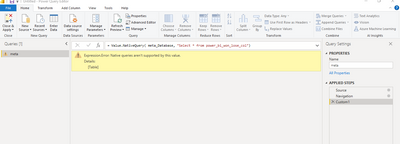
Thanks, @lbendlin for your reply. I have tried what you said. But I am facing this error. I followed this video (https://www.youtube.com/watch?v=8hjdOCni_ZY)

alt_RG_0-1658120845690.png
alt_RG_1-1658120890587.png


alt_RG
Frequent Visitor

@lbendlin, Can you please help me with this issue? 

Sorry, I don't have a MongoDB environment to play with.  Maybe someone else can test it out.

lbendlin
Super User
Super User

You are not actually doing an incremental refresh. Instead, you apply the RangeStart/RangeEnd filter over the full result set of your custom SQL query.


Move your SQL statement into the Power Query code (via Value.NativeQuery) and incorporate RangeStart and RangeEnd directly into that query.

Helpful resources

Announcements
New to Fabric survey Carousel

New to Fabric Survey

If you have recently started exploring Fabric, we'd love to hear how it's going. Your feedback can help with product improvements.

Power BI DataViz World Championships carousel

Power BI DataViz World Championships - June 2026

A new Power BI DataViz World Championship is coming this June! Don't miss out on submitting your entry.

FabCon and SQLCon Highlights Carousel

FabCon &SQLCon Highlights

Experience the highlights from FabCon & SQLCon, available live and on-demand starting April 14th.

March Power BI Update Carousel

Power BI Community Update - March 2026

Check out the March 2026 Power BI update to learn about new features.