




cancel
Showing results for 
Search instead for 
Did you mean: 

The Power BI Data Visualization World Championships is back! Get ahead of the game and start preparing now! Learn more

Reply
oliviaholmes
New Member

Merge/Consolidate Rows with Cascading Data

I need some help figuring out what to do for this data. I currently have 


Project IDProject NameFirst YearDiscountLong Term PlanProductionExampleExampleExample Example
1Project 12023nullnullnullnullnullnullnull
1Project 1 null10%nullnullnullnullnullnull
1Project 1nullnull.02nullnullnullnullnull


This data is multiple Projects and has about 75 Columns where data follows this pattern 


And I would Like to have 


Project IDProject NameFirst YearDiscountLong Term PlanProductionExampleExampleExample Example
1Project 1202310%.021005.2511
2Project 220185%.021500022.011


What can I do in Power Query to flatten this data? 

1 ACCEPTED SOLUTION
SpartaBI
Community Champion
Community Champion

Hi @oliviaholmes,

You can do an unpivot operation (this will remove any null values) and then re-pivot the data.
Have a look at the following code:


let
    Source = Table.FromRows(Json.Document(Binary.Decompress(Binary.FromText("i45WMlTSUQooys9KTS5RALFBGIRidTDlQNKGeCTB8oZgWSMkWRDbCMlYdDmYNA45kLSRkVJsLAA=", BinaryEncoding.Base64), Compression.Deflate)), let _t = ((type nullable text) meta [Serialized.Text = true]) in type table [#"Project ID" = _t, #"Project Name" = _t, Number1 = _t, Number2 = _t, Number3 = _t]),
    #"Changed Type" = Table.TransformColumnTypes(Source,{{"Project ID", type text}, {"Project Name", type text}, {"Number1", Int64.Type}, {"Number2", Int64.Type}, {"Number3", Int64.Type}}),
    #"Unpivoted Other Columns" = Table.UnpivotOtherColumns(#"Changed Type", {"Project ID", "Project Name"}, "Attribute", "Value"),
    #"Pivoted Column" = Table.Pivot(#"Unpivoted Other Columns", List.Distinct(#"Unpivoted Other Columns"[Attribute]), "Attribute", "Value")
in
    #"Pivoted Column"


Before:

SpartaBI_0-1656428425676.png

After:

SpartaBI_1-1656428441606.png


2022-05-19 17_30_22-Re_ Need help on DAX function with measure vs colu... - Microsoft Power BI Commu.png

Showcase Report – Contoso By SpartaBI


SpartaBI_3-1652115470761.png   SpartaBI_1-1652115142093.png   SpartaBI_2-1652115154505.png

Full-Logo11.png

View solution in original post

3 REPLIES 3
SpartaBI
Community Champion
Community Champion

Hi @oliviaholmes,

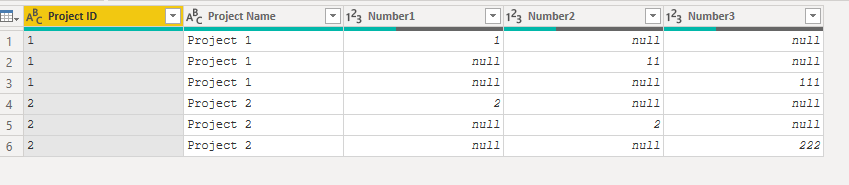
1. Start from your initial table.

SpartaBI_0-1656432648031.png

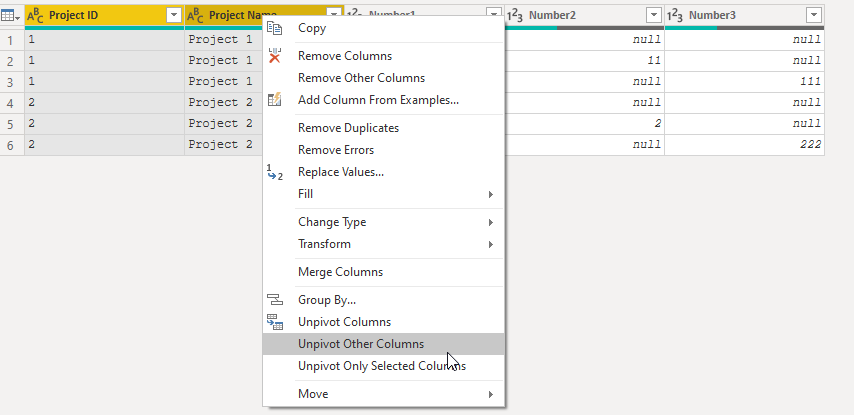
2. Select the Project ID & Project Name columns and then right-click and choose "unpivot other columns". 

SpartaBI_1-1656432762375.png
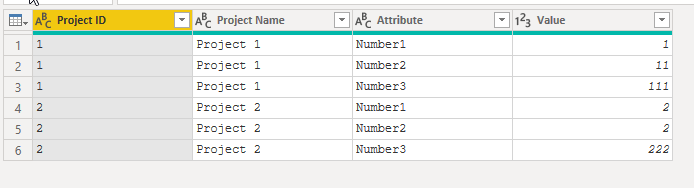
You should get:

SpartaBI_2-1656433032929.png

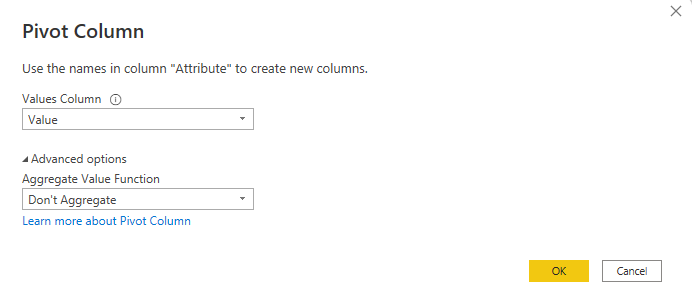
3. Select the "Attribute" column and then choose "Pivot Column".

SpartaBI_3-1656433163620.png

4. Fill the following:

SpartaBI_4-1656433203560.png
You should get:

SpartaBI_5-1656433250738.png


2022-05-19 17_30_22-Re_ Need help on DAX function with measure vs colu... - Microsoft Power BI Commu.png

Showcase Report – Contoso By SpartaBI


SpartaBI_3-1652115470761.png   SpartaBI_1-1652115142093.png   SpartaBI_2-1652115154505.png

Full-Logo11.png

SpartaBI
Community Champion
Community Champion

Hi @oliviaholmes,

You can do an unpivot operation (this will remove any null values) and then re-pivot the data.
Have a look at the following code:


let
    Source = Table.FromRows(Json.Document(Binary.Decompress(Binary.FromText("i45WMlTSUQooys9KTS5RALFBGIRidTDlQNKGeCTB8oZgWSMkWRDbCMlYdDmYNA45kLSRkVJsLAA=", BinaryEncoding.Base64), Compression.Deflate)), let _t = ((type nullable text) meta [Serialized.Text = true]) in type table [#"Project ID" = _t, #"Project Name" = _t, Number1 = _t, Number2 = _t, Number3 = _t]),
    #"Changed Type" = Table.TransformColumnTypes(Source,{{"Project ID", type text}, {"Project Name", type text}, {"Number1", Int64.Type}, {"Number2", Int64.Type}, {"Number3", Int64.Type}}),
    #"Unpivoted Other Columns" = Table.UnpivotOtherColumns(#"Changed Type", {"Project ID", "Project Name"}, "Attribute", "Value"),
    #"Pivoted Column" = Table.Pivot(#"Unpivoted Other Columns", List.Distinct(#"Unpivoted Other Columns"[Attribute]), "Attribute", "Value")
in
    #"Pivoted Column"


Before:

SpartaBI_0-1656428425676.png

After:

SpartaBI_1-1656428441606.png


2022-05-19 17_30_22-Re_ Need help on DAX function with measure vs colu... - Microsoft Power BI Commu.png

Showcase Report – Contoso By SpartaBI


SpartaBI_3-1652115470761.png   SpartaBI_1-1652115142093.png   SpartaBI_2-1652115154505.png

Full-Logo11.png

This is not working for me. When i use the code, it shows an error for all columns. Can you do a step walkthrough so I can mirror your actions @SpartaBI

Helpful resources

Announcements
Power BI DataViz World Championships

Power BI Dataviz World Championships

The Power BI Data Visualization World Championships is back! Get ahead of the game and start preparing now!

December 2025 Power BI Update Carousel

Power BI Monthly Update - December 2025

Check out the December 2025 Power BI Holiday Recap!

FabCon Atlanta 2026 carousel

FabCon Atlanta 2026

Join us at FabCon Atlanta, March 16-20, for the ultimate Fabric, Power BI, AI and SQL community-led event. Save $200 with code FABCOMM.

Top Solution Authors