cancel
Showing results for 
Search instead for 
Did you mean: 

The Power BI Data Visualization World Championships is back! Get ahead of the game and start preparing now! Learn more

Reply
AtchayaP
Helper V
Helper V

Powerbi

16564236638915519017459326575903.jpg

This is a column in a table.i want to count this by using delimiter.(comma).


@Vijay_A_Verma 

1 ACCEPTED SOLUTION
BITomS
Solution Supplier
Solution Supplier

Hi @AtchayaP,


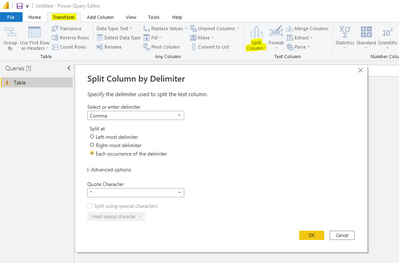
Under the assumption you have already loaded the column/table to Power Query, you can go to Transform > Split Column > By Delimiter > Comma (Each occurence of the delimiter):


OEMTomS_0-1656429771857.png


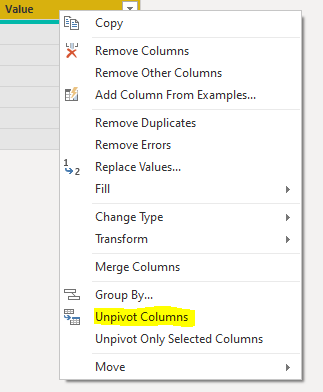
Next you can select all column headers, right click and select Unpivot Columns. This will put all the items in rows:


OEMTomS_1-1656429914319.png


Finally, apply these step changes and create a DAX measure in your model to count the number of rows (either COUNTROWS or DISTINCTCOUNT). Hope this helps.

View solution in original post

2 REPLIES 2
BITomS
Solution Supplier
Solution Supplier

Hi @AtchayaP,


Under the assumption you have already loaded the column/table to Power Query, you can go to Transform > Split Column > By Delimiter > Comma (Each occurence of the delimiter):


OEMTomS_0-1656429771857.png


Next you can select all column headers, right click and select Unpivot Columns. This will put all the items in rows:


OEMTomS_1-1656429914319.png


Finally, apply these step changes and create a DAX measure in your model to count the number of rows (either COUNTROWS or DISTINCTCOUNT). Hope this helps.

BITomS
Solution Supplier
Solution Supplier

Even simpler, you can expand 'Advanced Options' within the Split Column by Delimiter screenshot and split them to rows, which would skip out the middle step!

Helpful resources

Announcements
Power BI DataViz World Championships

Power BI Dataviz World Championships

The Power BI Data Visualization World Championships is back! Get ahead of the game and start preparing now!

December 2025 Power BI Update Carousel

Power BI Monthly Update - December 2025

Check out the December 2025 Power BI Holiday Recap!

FabCon Atlanta 2026 carousel

FabCon Atlanta 2026

Join us at FabCon Atlanta, March 16-20, for the ultimate Fabric, Power BI, AI and SQL community-led event. Save $200 with code FABCOMM.

Top Solution Authors