This time we’re going bigger than ever. Fabric, Power BI, SQL, AI and more. We're covering it all. You won't want to miss it.
Learn moreLevel up your Power BI skills this month - build one visual each week and tell better stories with data! Get started
This is a column in a table.i want to count this by using delimiter.(comma).
Solved! Go to Solution.
Hi @AtchayaP,
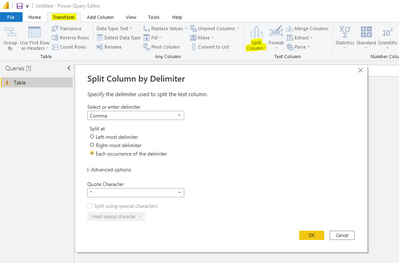
Under the assumption you have already loaded the column/table to Power Query, you can go to Transform > Split Column > By Delimiter > Comma (Each occurence of the delimiter):
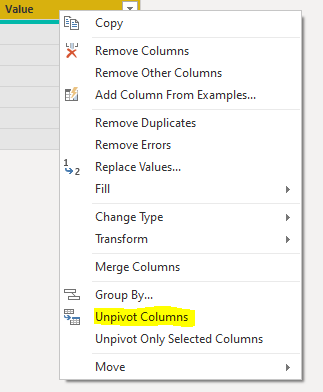
Next you can select all column headers, right click and select Unpivot Columns. This will put all the items in rows:
Finally, apply these step changes and create a DAX measure in your model to count the number of rows (either COUNTROWS or DISTINCTCOUNT). Hope this helps.
Hi @AtchayaP,
Under the assumption you have already loaded the column/table to Power Query, you can go to Transform > Split Column > By Delimiter > Comma (Each occurence of the delimiter):
Next you can select all column headers, right click and select Unpivot Columns. This will put all the items in rows:
Finally, apply these step changes and create a DAX measure in your model to count the number of rows (either COUNTROWS or DISTINCTCOUNT). Hope this helps.
Even simpler, you can expand 'Advanced Options' within the Split Column by Delimiter screenshot and split them to rows, which would skip out the middle step!
Check out the April 2026 Power BI update to learn about new features.
Sign up to receive a private message when registration opens and key events begin.
If you have recently started exploring Fabric, we'd love to hear how it's going. Your feedback can help with product improvements.