Don't miss your chance to take the Fabric Data Engineer (DP-600) exam for FREE! Find out how by attending the DP-600 session on April 23rd (pacific time), live or on-demand.
Learn moreNext up in the FabCon + SQLCon recap series: The roadmap for Microsoft SQL and Maximizing Developer experiences in Fabric. All sessions are available on-demand after the live show. Register now
This is a column in a table.i want to count this by using delimiter.(comma).
Solved! Go to Solution.
Hi @AtchayaP,
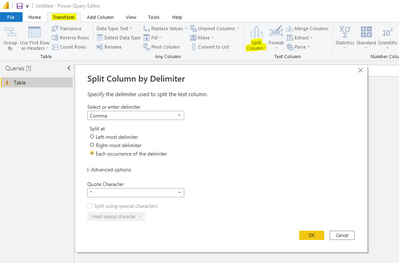
Under the assumption you have already loaded the column/table to Power Query, you can go to Transform > Split Column > By Delimiter > Comma (Each occurence of the delimiter):
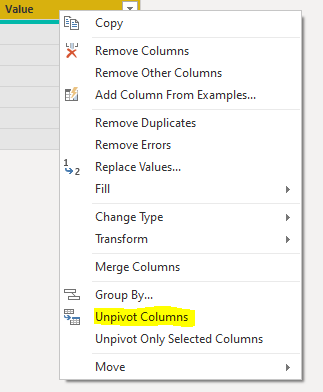
Next you can select all column headers, right click and select Unpivot Columns. This will put all the items in rows:
Finally, apply these step changes and create a DAX measure in your model to count the number of rows (either COUNTROWS or DISTINCTCOUNT). Hope this helps.
Hi @AtchayaP,
Under the assumption you have already loaded the column/table to Power Query, you can go to Transform > Split Column > By Delimiter > Comma (Each occurence of the delimiter):
Next you can select all column headers, right click and select Unpivot Columns. This will put all the items in rows:
Finally, apply these step changes and create a DAX measure in your model to count the number of rows (either COUNTROWS or DISTINCTCOUNT). Hope this helps.
Even simpler, you can expand 'Advanced Options' within the Split Column by Delimiter screenshot and split them to rows, which would skip out the middle step!
If you have recently started exploring Fabric, we'd love to hear how it's going. Your feedback can help with product improvements.
A new Power BI DataViz World Championship is coming this June! Don't miss out on submitting your entry.
Share feedback directly with Fabric product managers, participate in targeted research studies and influence the Fabric roadmap.
| User | Count |
|---|---|
| 5 | |
| 3 | |
| 3 | |
| 3 | |
| 2 |