Join us at FabCon Atlanta from March 16 - 20, 2026, for the ultimate Fabric, Power BI, AI and SQL community-led event. Save $200 with code FABCOMM.
Register now!Learn from the best! Meet the four finalists headed to the FINALS of the Power BI Dataviz World Championships! Register now
I have a table:
1/31/2019 --- 5.00 --- Washington
1/31/2019 --- 6.00 --- California
1/31/2019 --- 7.00 --- Oregon
1/31/2019 --- 10.00 --- Mexico
3/31/2019 --- 6.00 --- Washington
3/31/2019 --- 7.00 --- California
3/31/2019 --- 8.00 --- Oregon
3/31/2019 --- 9.00 --- Mexico
12/31/2019 --- 8.00 --- Washington
12/31/2019 --- 9.00 --- California
12/31/2019 --- 10.00 --- Oregon
12/31/2019 --- 11.00 --- Mexico
And i am trying to get the variance (YearEnd-MonthEnd) and show it in a matrix. Would you be able to assist?
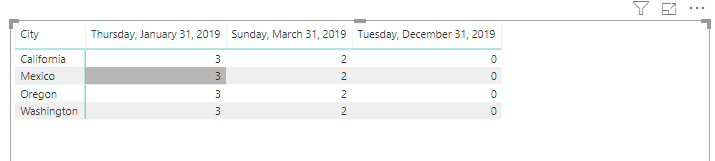
Here is how it should look like:
1/31/2019 12/31/2019
Washington 3 0
California 3 0
Oregon 3 0
Mexico 3 0
I created a new query and tried to merge and append the 2 queries but the matrix ends up summarizing the yearend data which is not correct. Thank you for your help.
Solved! Go to Solution.
Hi @Anonymous ,
To create a measure as below.
Measure 2 =
CALCULATE (
SUM ( 'Table'[time] ),
FILTER ( ALL ( 'Table' ), 'Table'[date] = ENDOFYEAR ( 'Table'[date] ) ),
VALUES ( 'Table'[City] )
)
- CALCULATE ( SUM ( 'Table'[time] ) )
Hi v-frfei-msft,
Thank you for the very quick reply and for providing the pbix file. I will have to modify the measure a little bit to make it work in our environment. Sorry i think i must have provided a slightly different scenario in my example. But i can certainly use your example to fix my problem.
Thank you again
Glen
You are so smart, i modified your measure a little bit and i was able to get exactly what i wanted.
%ToGoal =
Hi @Anonymous ,
To create a measure as below.
Measure 2 =
CALCULATE (
SUM ( 'Table'[time] ),
FILTER ( ALL ( 'Table' ), 'Table'[date] = ENDOFYEAR ( 'Table'[date] ) ),
VALUES ( 'Table'[City] )
)
- CALCULATE ( SUM ( 'Table'[time] ) )
You are so smart, i modified your measure a little bit and i was able to get exactly what i wanted.
%ToGoal =
Hi v-frfei-msft,
Thank you for the very quick reply and for providing the pbix file. I will have to modify the measure a little bit to make it work in our environment. Sorry i think i must have provided a slightly different scenario in my example. But i can certainly use your example to fix my problem.
Thank you again
Glen
Share feedback directly with Fabric product managers, participate in targeted research studies and influence the Fabric roadmap.
Check out the February 2026 Power BI update to learn about new features.