This time we’re going bigger than ever. Fabric, Power BI, SQL, AI and more. We're covering it all. You won't want to miss it.
Learn moreLevel up your Power BI skills this month - build one visual each week and tell better stories with data! Get started
I have a table:
1/31/2019 --- 5.00 --- Washington
1/31/2019 --- 6.00 --- California
1/31/2019 --- 7.00 --- Oregon
1/31/2019 --- 10.00 --- Mexico
3/31/2019 --- 6.00 --- Washington
3/31/2019 --- 7.00 --- California
3/31/2019 --- 8.00 --- Oregon
3/31/2019 --- 9.00 --- Mexico
12/31/2019 --- 8.00 --- Washington
12/31/2019 --- 9.00 --- California
12/31/2019 --- 10.00 --- Oregon
12/31/2019 --- 11.00 --- Mexico
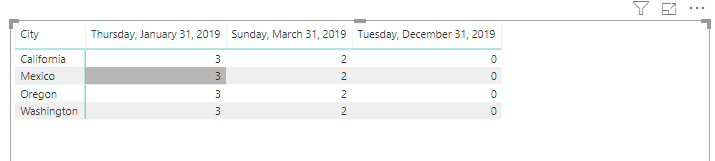
And i am trying to get the variance (YearEnd-MonthEnd) and show it in a matrix. Would you be able to assist?
Here is how it should look like:
1/31/2019 12/31/2019
Washington 3 0
California 3 0
Oregon 3 0
Mexico 3 0
I created a new query and tried to merge and append the 2 queries but the matrix ends up summarizing the yearend data which is not correct. Thank you for your help.
Solved! Go to Solution.
Hi @Anonymous ,
To create a measure as below.
Measure 2 =
CALCULATE (
SUM ( 'Table'[time] ),
FILTER ( ALL ( 'Table' ), 'Table'[date] = ENDOFYEAR ( 'Table'[date] ) ),
VALUES ( 'Table'[City] )
)
- CALCULATE ( SUM ( 'Table'[time] ) )
Hi v-frfei-msft,
Thank you for the very quick reply and for providing the pbix file. I will have to modify the measure a little bit to make it work in our environment. Sorry i think i must have provided a slightly different scenario in my example. But i can certainly use your example to fix my problem.
Thank you again
Glen
You are so smart, i modified your measure a little bit and i was able to get exactly what i wanted.
%ToGoal =
Hi @Anonymous ,
To create a measure as below.
Measure 2 =
CALCULATE (
SUM ( 'Table'[time] ),
FILTER ( ALL ( 'Table' ), 'Table'[date] = ENDOFYEAR ( 'Table'[date] ) ),
VALUES ( 'Table'[City] )
)
- CALCULATE ( SUM ( 'Table'[time] ) )
You are so smart, i modified your measure a little bit and i was able to get exactly what i wanted.
%ToGoal =
Hi v-frfei-msft,
Thank you for the very quick reply and for providing the pbix file. I will have to modify the measure a little bit to make it work in our environment. Sorry i think i must have provided a slightly different scenario in my example. But i can certainly use your example to fix my problem.
Thank you again
Glen
Check out the April 2026 Power BI update to learn about new features.
Sign up to receive a private message when registration opens and key events begin.
If you have recently started exploring Fabric, we'd love to hear how it's going. Your feedback can help with product improvements.
| User | Count |
|---|---|
| 3 | |
| 2 | |
| 2 | |
| 2 | |
| 2 |