Forum Discussion

Has anyone successfully connected Power BI to a Business Objects Universe
Has anyone successfully connected Power BI to a Business Objects Universe and is there anything I need to be aware of.
Any hints or tips would be greatfully received.
Here is what you need to know at high level about the limitations of Business Objects Connector for Power BI.
http://businessintelligist.com/2014/03/12/what-is-the-microsoft-power-bi-connector-for-sap/
You should not need the Personal Gateway to be able to use the connector. The Personal Gateway's job is to enable refresh of datasets that have been already published to PowerBI.com
Also, right not these are the supported on premise data sources, and Business Objects is not on the list:
- SQL Server
- Oracle
- Teradata
- IBM DB2
- PostgreSQL
- Sybase
- MySQL
- SharePoint List (on-premises)
- File (CSV, XML, Text, Excel, Access)
- On-premises SQL Server Analysis Services Tabular models (uploaded data; not live connections)
- Folder
- Custom SQL/native SQL

12 Replies
- KelvinGB1Regular Visitor
Thanks for your interesting reply, it looks like you have saved me a lot of time. I was surprised to see how restrictive this component is and as we have the older version of Business Objects with the older (UNV) universes, this will have no use for us as it currently stands.
I suppose my only options now are to either link to the databases directly (I don't really want to take this route as it is a Progress DB), or to produce excel spreadsheets from BO and connect to these with Power BI.
A bit messy but it would get the job done and I could schedule the excel reports to refresh each day.
Many thanks for your help
- andre
Memorable Member
Actually, connecting to the database directly may not be as daunting as you think. Obviously you would want to leverage existing investments in the semantic model, but you may be able to rebuild the logic very quickly in PowerPivot or Desktop. Extracting to Excel sounds painful.
- KelvinGB1Regular Visitor
Unfortunately, although messy, getting BO to produce scheduled Excel reports and using Power BI to produce a dashboard from those is a lot less hassle than trying to persuade the DB supplier to give me access to interigate the DB directly.
I could see a time in the future where something has become corrupted in the DB and the supplier points the finger at Power BI as being the issue.
Hopefully the application will, in the not too distant future, be moving over to a SQL DB, which will make it more accessable.
- KelvinGB1Regular Visitor
Thank you for sending me the link to the video.
I haven't had the time to attempt this yet but I am with you in thinking the video over simplifies the process.
I was anticipating some firewall issues but was wondering if there were any other issues before I bite the bullet.
I would think it will be early next week when I try so I will let you know how I get on.
- KelvinGB1Regular Visitor
I have just spent some time looking at this and it was as I suspected, "No response from remote server", which means I need to spend some time with our network team.
Apart from this it appears to be very straight forward to connect and produce reports. I created a couple of Excel spreadsheets from Business Objects and connected to these with out issue, (as they say create charts in minutes).
I will keep everyone posted when I sort out my network issue but as a first trial it all looks very promising.
Note I forgot to say that you need to download Power BI Designer before connecting to Business Objects.
- timrodman
Helper I
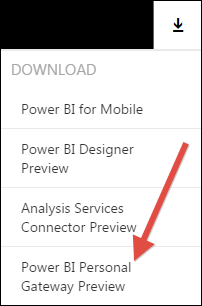
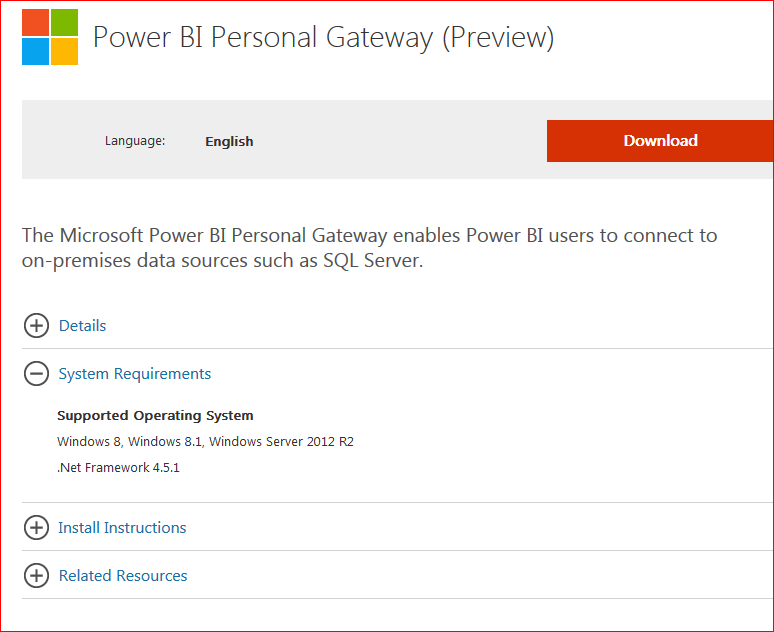
I wonder if Power BI Personal Gateway can somehow help to get into your comany's network.
- KelvinGB1Regular Visitor
The Gateway will not install on my PC, I think it is Windows 8 onwards, I am on W7 pro.
Worth a try though
- andre
Here is what you need to know at high level about the limitations of Business Objects Connector for Power BI.
http://businessintelligist.com/2014/03/12/what-is-the-microsoft-power-bi-connector-for-sap/
You should not need the Personal Gateway to be able to use the connector. The Personal Gateway's job is to enable refresh of datasets that have been already published to PowerBI.com
Also, right not these are the supported on premise data sources, and Business Objects is not on the list:
- SQL Server
- Oracle
- Teradata
- IBM DB2
- PostgreSQL
- Sybase
- MySQL
- SharePoint List (on-premises)
- File (CSV, XML, Text, Excel, Access)
- On-premises SQL Server Analysis Services Tabular models (uploaded data; not live connections)
- Folder
- Custom SQL/native SQL
- KelvinGB1Regular Visitor
Not sure if it's a lack of knowledge that prevents them from opening up their systems, or that they are just trying to cling on to the "Good Old Days" where it was virtually impossible to get applications to talk to each other. Anyone else remember Biztalk.........(Could be another topic).