cancel
Showing results for 
Search instead for 
Did you mean: 

Data Days is here! Join us now for 60+ days of learning, challenges, and connection. Learn more

Reply
dpombal
Post Partisan
Post Partisan

HTTP POST request with form urlencoded data

Hi all,


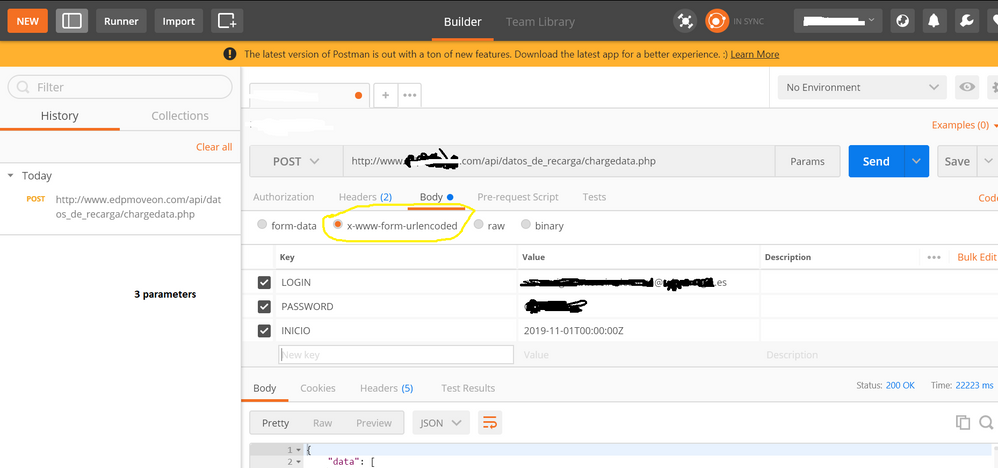
I am trying to reproduce below API HTTP Post call , successful in Postman:

Postman configuration

  1. Authorization key with a tokensequence
  2. Body with 3 parameters and important select option x-www-form-urlencoded


HeaderHeaderParametersParameters


I tried several M codes with this template and modifications


let
auth_key ="XXXXXXXXXXXXX",
base_url = "www.WEBPAGE.com",
extension = "/api/datos_de_recarga/chargedata.php",
url = base_url &extension,
header= [#"Authorization" = auth_key,
#"Content-Type" = "application/x-www-form-urlencoded"],
content1= "{
""LOGIN"":""USER@domain.es"",
""PASSWORD"":""PASS"",
""INICIO"":""2019-11-01T00:00:00Z""
}",
webdata1 = Web.Contents(url, [Headers=header,Content = Text.ToBinary(content1)]),
response1 = Json.Document(webdata1)
in
response1


All with denied access

Regards

1 ACCEPTED SOLUTION

This option worked finally for me, will try to make code better using parameters, but is is a good start.


CODE OK

let
auth_key ="XXXXXXXXXXXXXXXXXXX",
base_url = "www.hostname.com",
extension = "/api/datos_de_recarga/chargedata.php",
url = base_url &extension,
header= [#"Authorization" = auth_key,
#"Content-Type" = "application/x-www-form-urlencoded"],
content1= "LOGIN=USER@DOMAIN.es&PASSWORD=XXXXXX&INICIO=2019-11-01T00:00:00Z",
webdata1 = Web.Contents(url, [Headers=[#"Authorization" = auth_key,
#"Content-Type" = "application/x-www-form-urlencoded"],Content = Text.ToBinary(content1)]),
response1 = Json.Document(webdata1)
in
response1

View solution in original post

5 REPLIES 5
artemus
Microsoft Employee
Microsoft Employee

Try using: Uri.BuildQueryString(record) to build your query string instead of manually entering it as a string. Might be some encoding issue.

can you assist me? i tried my characters with and without encoding...think this is not my current issue

where to use Uri.BuildQueryString(record)

artemus
Microsoft Employee
Microsoft Employee

First change

content1= "{
""LOGIN"":""USER@domain.es"",
""PASSWORD"":""PASS"",
""INICIO"":""2019-11-01T00:00:00Z""
}",


to


content1 =

[

   LOGIN = "USER@domain.es",

   PASSWORD = "PASS",

   INCIO = #datetimezone(2019, 11, 1, 0, 0, 0, 0, 0)

]


then change:

Text.ToBinary(content1)

with

Text.ToBinary(Uri.BuildQueryString(content1))

This option worked finally for me, will try to make code better using parameters, but is is a good start.


CODE OK

let
auth_key ="XXXXXXXXXXXXXXXXXXX",
base_url = "www.hostname.com",
extension = "/api/datos_de_recarga/chargedata.php",
url = base_url &extension,
header= [#"Authorization" = auth_key,
#"Content-Type" = "application/x-www-form-urlencoded"],
content1= "LOGIN=USER@DOMAIN.es&PASSWORD=XXXXXX&INICIO=2019-11-01T00:00:00Z",
webdata1 = Web.Contents(url, [Headers=[#"Authorization" = auth_key,
#"Content-Type" = "application/x-www-form-urlencoded"],Content = Text.ToBinary(content1)]),
response1 = Json.Document(webdata1)
in
response1

Wow, thanks so much for posting this...I spent some time in trying to get to this and your post had the final bit of info I needed. Many thanks 🙂

Helpful resources

Announcements
Fabric Data Days is here Carousel

Fabric Data Days 2026

Don't miss out on Data Days, June 15 through August 7. Learn Fabric, Power BI, SQL, AI and more.

May Power BI Update Carousel

Power BI Monthly Update - May 2026

Check out the May 2026 Power BI update to learn about new features.

Power BI DataViz World Championships carousel

Power BI DataViz World Championships - June 2026

A new Power BI DataViz World Championship is coming this June! Don't miss out on submitting your entry.