Join us at FabCon Atlanta from March 16 - 20, 2026, for the ultimate Fabric, Power BI, AI and SQL community-led event. Save $200 with code FABCOMM.
Register now!Vote for your favorite vizzies from the Power BI Dataviz World Championship submissions. Vote now!
Hi all,
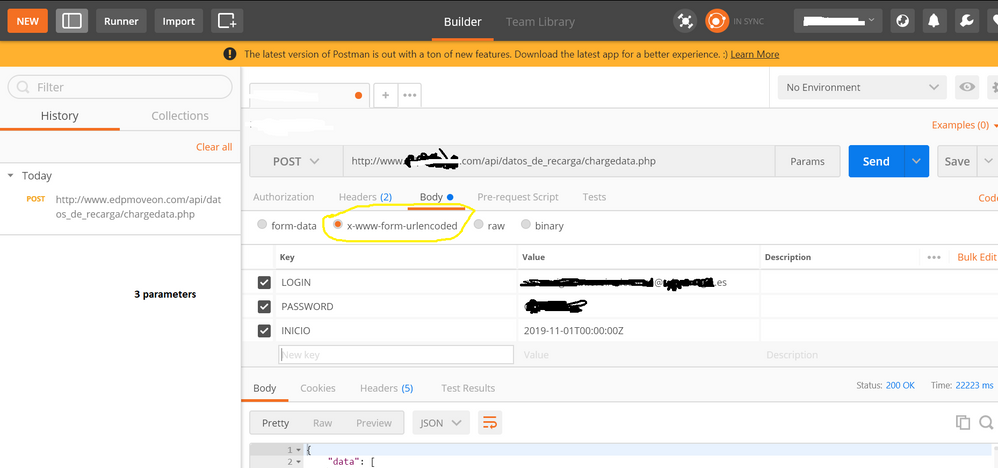
I am trying to reproduce below API HTTP Post call , successful in Postman:
Postman configuration
Header
Parameters
I tried several M codes with this template and modifications
let
auth_key ="XXXXXXXXXXXXX",
base_url = "www.WEBPAGE.com",
extension = "/api/datos_de_recarga/chargedata.php",
url = base_url &extension,
header= [#"Authorization" = auth_key,
#"Content-Type" = "application/x-www-form-urlencoded"],
content1= "{
""LOGIN"":""USER@domain.es"",
""PASSWORD"":""PASS"",
""INICIO"":""2019-11-01T00:00:00Z""
}",
webdata1 = Web.Contents(url, [Headers=header,Content = Text.ToBinary(content1)]),
response1 = Json.Document(webdata1)
in
response1
All with denied access
Regards
Solved! Go to Solution.
This option worked finally for me, will try to make code better using parameters, but is is a good start.
CODE OK
let
auth_key ="XXXXXXXXXXXXXXXXXXX",
base_url = "www.hostname.com",
extension = "/api/datos_de_recarga/chargedata.php",
url = base_url &extension,
header= [#"Authorization" = auth_key,
#"Content-Type" = "application/x-www-form-urlencoded"],
content1= "LOGIN=USER@DOMAIN.es&PASSWORD=XXXXXX&INICIO=2019-11-01T00:00:00Z",
webdata1 = Web.Contents(url, [Headers=[#"Authorization" = auth_key,
#"Content-Type" = "application/x-www-form-urlencoded"],Content = Text.ToBinary(content1)]),
response1 = Json.Document(webdata1)
in
response1
Try using: Uri.BuildQueryString(record) to build your query string instead of manually entering it as a string. Might be some encoding issue.
can you assist me? i tried my characters with and without encoding...think this is not my current issue
where to use Uri.BuildQueryString(record)
First change
content1= "{
""LOGIN"":""USER@domain.es"",
""PASSWORD"":""PASS"",
""INICIO"":""2019-11-01T00:00:00Z""
}",
to
content1 =
[
LOGIN = "USER@domain.es",
PASSWORD = "PASS",
INCIO = #datetimezone(2019, 11, 1, 0, 0, 0, 0, 0)
]
then change:
Text.ToBinary(content1)
with
Text.ToBinary(Uri.BuildQueryString(content1))
This option worked finally for me, will try to make code better using parameters, but is is a good start.
CODE OK
let
auth_key ="XXXXXXXXXXXXXXXXXXX",
base_url = "www.hostname.com",
extension = "/api/datos_de_recarga/chargedata.php",
url = base_url &extension,
header= [#"Authorization" = auth_key,
#"Content-Type" = "application/x-www-form-urlencoded"],
content1= "LOGIN=USER@DOMAIN.es&PASSWORD=XXXXXX&INICIO=2019-11-01T00:00:00Z",
webdata1 = Web.Contents(url, [Headers=[#"Authorization" = auth_key,
#"Content-Type" = "application/x-www-form-urlencoded"],Content = Text.ToBinary(content1)]),
response1 = Json.Document(webdata1)
in
response1
Wow, thanks so much for posting this...I spent some time in trying to get to this and your post had the final bit of info I needed. Many thanks 🙂
Vote for your favorite vizzies from the Power BI World Championship submissions!
If you love stickers, then you will definitely want to check out our Community Sticker Challenge!
Check out the January 2026 Power BI update to learn about new features.
| User | Count |
|---|---|
| 11 | |
| 11 | |
| 6 | |
| 6 | |
| 6 |