Get certified for free when you join Fabric Data Days 2026 and dive into Fabric, Power BI, SQL, AI, and other essential data skills.
Join nowJuly 28 - August 9 | Final Round of the Power BI Dataviz World Championships. This is your chance. Learn more
Hi all,
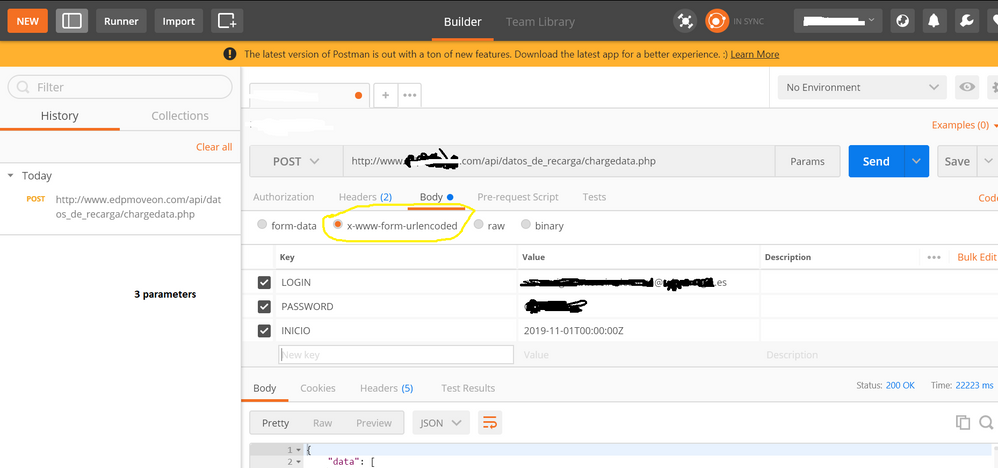
I am trying to reproduce below API HTTP Post call , successful in Postman:
Postman configuration
Header
Parameters
I tried several M codes with this template and modifications
let
auth_key ="XXXXXXXXXXXXX",
base_url = "www.WEBPAGE.com",
extension = "/api/datos_de_recarga/chargedata.php",
url = base_url &extension,
header= [#"Authorization" = auth_key,
#"Content-Type" = "application/x-www-form-urlencoded"],
content1= "{
""LOGIN"":""[email protected]"",
""PASSWORD"":""PASS"",
""INICIO"":""2019-11-01T00:00:00Z""
}",
webdata1 = Web.Contents(url, [Headers=header,Content = Text.ToBinary(content1)]),
response1 = Json.Document(webdata1)
in
response1
All with denied access
Regards
Solved! Go to Solution.
This option worked finally for me, will try to make code better using parameters, but is is a good start.
CODE OK
let
auth_key ="XXXXXXXXXXXXXXXXXXX",
base_url = "www.hostname.com",
extension = "/api/datos_de_recarga/chargedata.php",
url = base_url &extension,
header= [#"Authorization" = auth_key,
#"Content-Type" = "application/x-www-form-urlencoded"],
content1= "[email protected]&PASSWORD=XXXXXX&INICIO=2019-11-01T00:00:00Z",
webdata1 = Web.Contents(url, [Headers=[#"Authorization" = auth_key,
#"Content-Type" = "application/x-www-form-urlencoded"],Content = Text.ToBinary(content1)]),
response1 = Json.Document(webdata1)
in
response1
Try using: Uri.BuildQueryString(record) to build your query string instead of manually entering it as a string. Might be some encoding issue.
can you assist me? i tried my characters with and without encoding...think this is not my current issue
where to use Uri.BuildQueryString(record)
First change
content1= "{
""LOGIN"":""[email protected]"",
""PASSWORD"":""PASS"",
""INICIO"":""2019-11-01T00:00:00Z""
}",
to
content1 =
[
LOGIN = "[email protected]",
PASSWORD = "PASS",
INCIO = #datetimezone(2019, 11, 1, 0, 0, 0, 0, 0)
]
then change:
Text.ToBinary(content1)
with
Text.ToBinary(Uri.BuildQueryString(content1))
This option worked finally for me, will try to make code better using parameters, but is is a good start.
CODE OK
let
auth_key ="XXXXXXXXXXXXXXXXXXX",
base_url = "www.hostname.com",
extension = "/api/datos_de_recarga/chargedata.php",
url = base_url &extension,
header= [#"Authorization" = auth_key,
#"Content-Type" = "application/x-www-form-urlencoded"],
content1= "[email protected]&PASSWORD=XXXXXX&INICIO=2019-11-01T00:00:00Z",
webdata1 = Web.Contents(url, [Headers=[#"Authorization" = auth_key,
#"Content-Type" = "application/x-www-form-urlencoded"],Content = Text.ToBinary(content1)]),
response1 = Json.Document(webdata1)
in
response1
Wow, thanks so much for posting this...I spent some time in trying to get to this and your post had the final bit of info I needed. Many thanks 🙂
If you love stickers, then you will definitely want to check out our community sticker challenge, Barcelona edition!
Check out the July 2026 Power BI update to learn about new features.
| User | Count |
|---|---|
| 4 | |
| 2 | |
| 2 | |
| 2 | |
| 1 |