This is best Fabric, Power BI, SQL and AI community event. How do we know? The last event sold out! Save €200 with code FABCMTY200.
Register nowA new Data Days event is coming soon! This time we’re going bigger than ever. Fabric, Power BI, SQL, AI and more. Don't miss out.
Hi all,
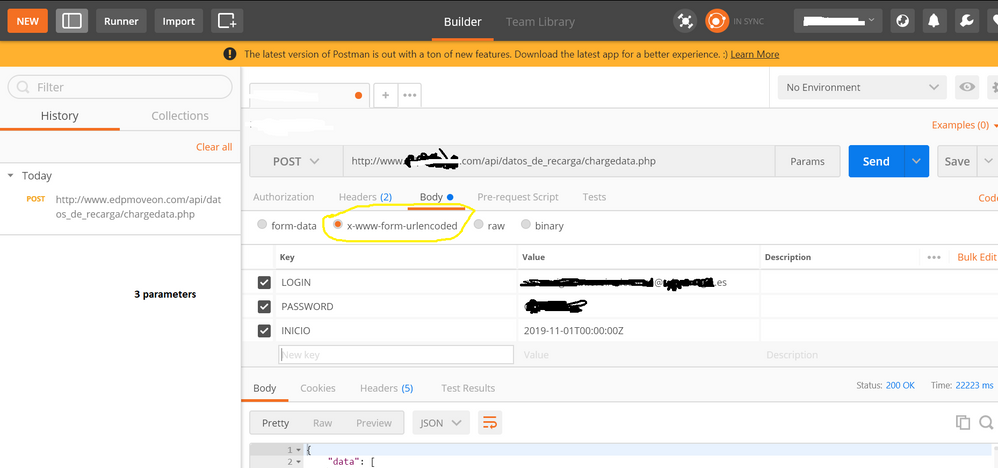
I am trying to reproduce below API HTTP Post call , successful in Postman:
Postman configuration
Header
Parameters
I tried several M codes with this template and modifications
let
auth_key ="XXXXXXXXXXXXX",
base_url = "www.WEBPAGE.com",
extension = "/api/datos_de_recarga/chargedata.php",
url = base_url &extension,
header= [#"Authorization" = auth_key,
#"Content-Type" = "application/x-www-form-urlencoded"],
content1= "{
""LOGIN"":""USER@domain.es"",
""PASSWORD"":""PASS"",
""INICIO"":""2019-11-01T00:00:00Z""
}",
webdata1 = Web.Contents(url, [Headers=header,Content = Text.ToBinary(content1)]),
response1 = Json.Document(webdata1)
in
response1
All with denied access
Regards
Solved! Go to Solution.
This option worked finally for me, will try to make code better using parameters, but is is a good start.
CODE OK
let
auth_key ="XXXXXXXXXXXXXXXXXXX",
base_url = "www.hostname.com",
extension = "/api/datos_de_recarga/chargedata.php",
url = base_url &extension,
header= [#"Authorization" = auth_key,
#"Content-Type" = "application/x-www-form-urlencoded"],
content1= "LOGIN=USER@DOMAIN.es&PASSWORD=XXXXXX&INICIO=2019-11-01T00:00:00Z",
webdata1 = Web.Contents(url, [Headers=[#"Authorization" = auth_key,
#"Content-Type" = "application/x-www-form-urlencoded"],Content = Text.ToBinary(content1)]),
response1 = Json.Document(webdata1)
in
response1
Try using: Uri.BuildQueryString(record) to build your query string instead of manually entering it as a string. Might be some encoding issue.
can you assist me? i tried my characters with and without encoding...think this is not my current issue
where to use Uri.BuildQueryString(record)
First change
content1= "{
""LOGIN"":""USER@domain.es"",
""PASSWORD"":""PASS"",
""INICIO"":""2019-11-01T00:00:00Z""
}",
to
content1 =
[
LOGIN = "USER@domain.es",
PASSWORD = "PASS",
INCIO = #datetimezone(2019, 11, 1, 0, 0, 0, 0, 0)
]
then change:
Text.ToBinary(content1)
with
Text.ToBinary(Uri.BuildQueryString(content1))
This option worked finally for me, will try to make code better using parameters, but is is a good start.
CODE OK
let
auth_key ="XXXXXXXXXXXXXXXXXXX",
base_url = "www.hostname.com",
extension = "/api/datos_de_recarga/chargedata.php",
url = base_url &extension,
header= [#"Authorization" = auth_key,
#"Content-Type" = "application/x-www-form-urlencoded"],
content1= "LOGIN=USER@DOMAIN.es&PASSWORD=XXXXXX&INICIO=2019-11-01T00:00:00Z",
webdata1 = Web.Contents(url, [Headers=[#"Authorization" = auth_key,
#"Content-Type" = "application/x-www-form-urlencoded"],Content = Text.ToBinary(content1)]),
response1 = Json.Document(webdata1)
in
response1
Wow, thanks so much for posting this...I spent some time in trying to get to this and your post had the final bit of info I needed. Many thanks 🙂
Check out the May 2026 Power BI update to learn about new features.
Sign up to receive a private message when registration opens and key events begin.
If you have recently started exploring Fabric, we'd love to hear how it's going. Your feedback can help with product improvements.