cancel
Showing results for 
Search instead for 
Did you mean: 

The Power BI Data Visualization World Championships is back! Get ahead of the game and start preparing now! Learn more

Reply
motoroto
Frequent Visitor

Getting data from Microsof Access

Hello, I have a pbix file which source is a microsoft access file (no password protected), I have no problem getting data from Power BI Desktop.

However, when i upload the file to app.power.bi.com there is no way I have found to update the data from here (I need to update from PBI Desktop and upload it on a daily basis).


I have tried several ways:

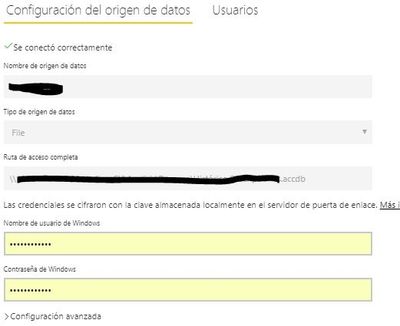
1. Create a data gateway using "File" as a data source. When creating the data gateway I can connect...


Upload1.JPG

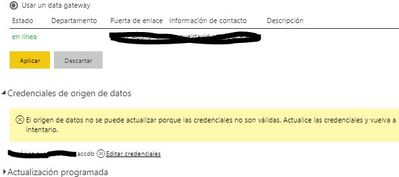
But when I try to configure the data set, I get an error requesting update of credentials


Uplad2.JPG


2. I have also tried creating the PBI Desktop file using a oledb connection, once again, no problem with the PBIX file. But when creating the OLEDB data gateway, I´m asked a user name and password, the problem is the access file is not password protected (since PBI Desktop currently does not support get data from password protected access files).

I can´t get passed this problem.


Hope you can help!

1 ACCEPTED SOLUTION
Anonymous
Not applicable

@motoroto,


Currently, on-premises gateway can't connect to Access database, please use on-premises gateway(personal mode) instead to refresh the Access database.


In addition, there is an idea about adding Access as data source for on-premises gateway, you can vote it up.


Regards,

Lydia

View solution in original post

6 REPLIES 6
Anonymous
Not applicable

@motoroto,


Currently, on-premises gateway can't connect to Access database, please use on-premises gateway(personal mode) instead to refresh the Access database.


In addition, there is an idea about adding Access as data source for on-premises gateway, you can vote it up.


Regards,

Lydia

Thanks Lydia, is there a way to use both, on-premises gateway and on-prem.. (personal mode) for different sets of data?

Anonymous
Not applicable

@motoroto,

You are able to use different gateways for different datasets. However, for a single dataset, you should add all data sources under a single gateway. In other words, it is not possible to add a part of data sources of the single dataset within on-premises gateway and add remaining data sources within in-premises gateway(personal mode), then use the two gateways to refresh the single dataset.

Regards,
Lydia

Thanks Lidya, now I have it more clear. I´ll have to figure out how to set up 2 gateways.

Greg_Deckler
Community Champion
Community Champion

Did you try Windows credentials?


Follow on LinkedIn
@ me in replies or I'll lose your thread!!!
Instead of a Kudo, please vote for this idea
Become an expert!: Enterprise DNA
External Tools: MSHGQM
YouTube Channel!: Microsoft Hates Greg
Latest book!:
DAX For Humans

DAX is easy, CALCULATE makes DAX hard...

Yes, I tried. It didn´t work.


Thanks

Helpful resources

Announcements
Power BI DataViz World Championships

Power BI Dataviz World Championships

The Power BI Data Visualization World Championships is back! Get ahead of the game and start preparing now!

November Power BI Update Carousel

Power BI Monthly Update - November 2025

Check out the November 2025 Power BI update to learn about new features.

FabCon Atlanta 2026 carousel

FabCon Atlanta 2026

Join us at FabCon Atlanta, March 16-20, for the ultimate Fabric, Power BI, AI and SQL community-led event. Save $200 with code FABCOMM.