cancel
Showing results for 
Search instead for 
Did you mean: 

July 7 - July 17 | Round 2 of the Power BI Dataviz World Championships. Don't miss your chance! Learn more

Reply
motoroto
Frequent Visitor

Getting data from Microsof Access

Hello, I have a pbix file which source is a microsoft access file (no password protected), I have no problem getting data from Power BI Desktop.

However, when i upload the file to app.power.bi.com there is no way I have found to update the data from here (I need to update from PBI Desktop and upload it on a daily basis).


I have tried several ways:

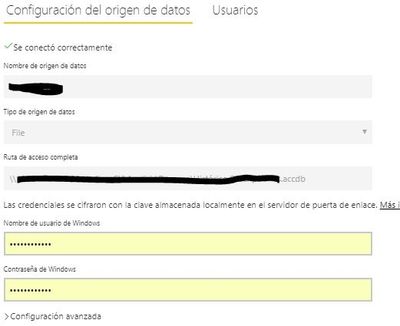
1. Create a data gateway using "File" as a data source. When creating the data gateway I can connect...


Upload1.JPG

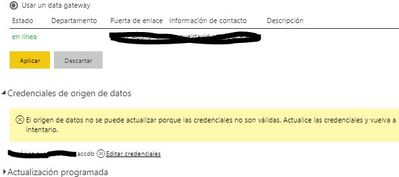
But when I try to configure the data set, I get an error requesting update of credentials


Uplad2.JPG


2. I have also tried creating the PBI Desktop file using a oledb connection, once again, no problem with the PBIX file. But when creating the OLEDB data gateway, I´m asked a user name and password, the problem is the access file is not password protected (since PBI Desktop currently does not support get data from password protected access files).

I can´t get passed this problem.


Hope you can help!

1 ACCEPTED SOLUTION
Anonymous
Not applicable

@motoroto,


Currently, on-premises gateway can't connect to Access database, please use on-premises gateway(personal mode) instead to refresh the Access database.


In addition, there is an idea about adding Access as data source for on-premises gateway, you can vote it up.


Regards,

Lydia

View solution in original post

6 REPLIES 6
Anonymous
Not applicable

@motoroto,


Currently, on-premises gateway can't connect to Access database, please use on-premises gateway(personal mode) instead to refresh the Access database.


In addition, there is an idea about adding Access as data source for on-premises gateway, you can vote it up.


Regards,

Lydia

Thanks Lydia, is there a way to use both, on-premises gateway and on-prem.. (personal mode) for different sets of data?

Anonymous
Not applicable

@motoroto,

You are able to use different gateways for different datasets. However, for a single dataset, you should add all data sources under a single gateway. In other words, it is not possible to add a part of data sources of the single dataset within on-premises gateway and add remaining data sources within in-premises gateway(personal mode), then use the two gateways to refresh the single dataset.

Regards,
Lydia

Thanks Lidya, now I have it more clear. I´ll have to figure out how to set up 2 gateways.

Greg_Deckler
Community Champion
Community Champion

Did you try Windows credentials?


Follow on LinkedIn
@ me in replies or I'll lose your thread!!!
Instead of a Kudo, please vote for this idea
Become an expert!: Enterprise DNA
External Tools: MSHGQM
YouTube Channel!: Microsoft Hates Greg
Latest book!:
DAX For Humans

DAX is easy, CALCULATE makes DAX hard...

Yes, I tried. It didn´t work.


Thanks

Helpful resources

Announcements
FabCon and SQLCon Barcelona 2026

FabCon & SQLCon – Barcelona 2026

Join us in Barcelona for FabCon and SQLCon, the Fabric, Power BI, SQL, and AI community event. Save €200 with code FABCMTY200.

60 days of Data Days Carousel

Data Days 2026

Join Fabric Data Days 2026: 60 days of free live/on-demand sessions, challenges, study groups, and certification opportunities.

Power BI DataViz World Championships carousel

Power BI DataViz World Championships - June 2026

A new Power BI DataViz World Championship is coming this June! Don't miss out on submitting your entry.