This time we’re going bigger than ever. Fabric, Power BI, SQL, AI and more. We're covering it all. You won't want to miss it.
Learn moreLevel up your Power BI skills this month - build one visual each week and tell better stories with data! Get started
Hi all,
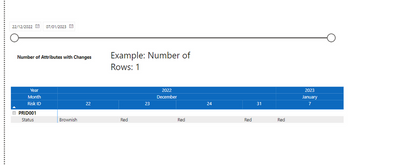
I am trying to create a visual which counts the number of distinct rows that are displayed on the matrix shown above.
Please note I have the measure in the matrix filters (distinctcount) to only show me rows that have different values in each date column (hopefully clearly shown)
E.g. There are rows which have the same data across the dates and therefore they are hidden.
Does anyone know how I can count the number of distinct rows showing based on the date range selected?
Full data sat can be found Below
pbix file: https://we.tl/t-vd5jYugdD6
Solved! Go to Solution.
Attributes with Changes =
var a = summarize('Project Risks Query-xxx','Project Risks Query-xxx'[Attribute],'Project Risks Query-xxx'[Risk ID],"ch",DISTINCTCOUNT('Project Risks Query-xxx'[Value]))
var b = summarize(filter(a,[ch]>1),[Attribute])
return countrows(b)
see attached
Please provide sanitized sample data that fully covers your issue.
Attributes with Changes =
var a = summarize('Project Risks Query-xxx','Project Risks Query-xxx'[Attribute],'Project Risks Query-xxx'[Risk ID],"ch",DISTINCTCOUNT('Project Risks Query-xxx'[Value]))
var b = summarize(filter(a,[ch]>1),[Attribute])
return countrows(b)
see attached
Check out the April 2026 Power BI update to learn about new features.
Sign up to receive a private message when registration opens and key events begin.
If you have recently started exploring Fabric, we'd love to hear how it's going. Your feedback can help with product improvements.