Join us at FabCon Atlanta from March 16 - 20, 2026, for the ultimate Fabric, Power BI, AI and SQL community-led event. Save $200 with code FABCOMM.
Register now!The Power BI Data Visualization World Championships is back! Get ahead of the game and start preparing now! Learn more
Hi all,
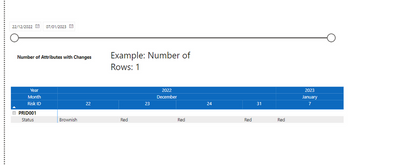
I am trying to create a visual which counts the number of distinct rows that are displayed on the matrix shown above.
Please note I have the measure in the matrix filters (distinctcount) to only show me rows that have different values in each date column (hopefully clearly shown)
E.g. There are rows which have the same data across the dates and therefore they are hidden.
Does anyone know how I can count the number of distinct rows showing based on the date range selected?
Full data sat can be found Below
pbix file: https://we.tl/t-vd5jYugdD6
Solved! Go to Solution.
Attributes with Changes =
var a = summarize('Project Risks Query-xxx','Project Risks Query-xxx'[Attribute],'Project Risks Query-xxx'[Risk ID],"ch",DISTINCTCOUNT('Project Risks Query-xxx'[Value]))
var b = summarize(filter(a,[ch]>1),[Attribute])
return countrows(b)
see attached
Please provide sanitized sample data that fully covers your issue.
Attributes with Changes =
var a = summarize('Project Risks Query-xxx','Project Risks Query-xxx'[Attribute],'Project Risks Query-xxx'[Risk ID],"ch",DISTINCTCOUNT('Project Risks Query-xxx'[Value]))
var b = summarize(filter(a,[ch]>1),[Attribute])
return countrows(b)
see attached
The Power BI Data Visualization World Championships is back! Get ahead of the game and start preparing now!