

cancel
Showing results for 
Search instead for 
Did you mean: 

The Power BI Data Visualization World Championships is back! Get ahead of the game and start preparing now! Learn more

Reply
Anonymous
Not applicable

Expression.SyntaxError: Invalid identifier

Hi,

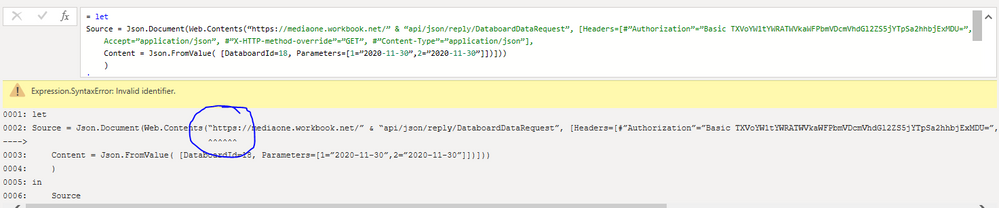
I am trying to pull data from our ERP database via an API. I had tested the API call with Postman and then took the basic authorization key from Postman and inserted it in the query in Power BI. However, the query in Power BI is giving the below error:

Expression.SyntaxError: Invalid identifier


The snippet of the error is below.

Highly appreciate it if somebody can help. 


Power BI Query Error 2020-12-12.PNG

1 ACCEPTED SOLUTION
Fowmy
Super User
Super User

@Anonymous 

Can you try replacing those open and close quotations using your keyboard for " 

________________________

If my answer was helpful, please click Accept it as the solution to help other members find it useful

Click on the Thumbs-Up icon if you like this reply 🙂


Website YouTube  LinkedIn

Did I answer your question? Mark my post as a solution! and hit thumbs up


Subscribe and learn Power BI from these videos

Website LinkedIn PBI User Group

View solution in original post

3 REPLIES 3
Fowmy
Super User
Super User

@Anonymous 

Can you try replacing those open and close quotations using your keyboard for " 

________________________

If my answer was helpful, please click Accept it as the solution to help other members find it useful

Click on the Thumbs-Up icon if you like this reply 🙂


Website YouTube  LinkedIn

Did I answer your question? Mark my post as a solution! and hit thumbs up


Subscribe and learn Power BI from these videos

Website LinkedIn PBI User Group

Anonymous
Not applicable

Hi Fowmy,

I tried replacing them with but it gives an error as below: 

Power BI Query Error 2020-12-12 A.PNG

Anonymous
Not applicable

Hi @Fowmy 

I figured that out and finally fixed the syntax errors. However, now I face another issue. The error snapshot is attached. 

Appreciate if you can please help. 

Thanks.... 


Power BI Query Error 2020-12-12 C.PNG

Helpful resources

Announcements
Power BI DataViz World Championships

Power BI Dataviz World Championships

The Power BI Data Visualization World Championships is back! Get ahead of the game and start preparing now!

December 2025 Power BI Update Carousel

Power BI Monthly Update - December 2025

Check out the December 2025 Power BI Holiday Recap!

FabCon Atlanta 2026 carousel

FabCon Atlanta 2026

Join us at FabCon Atlanta, March 16-20, for the ultimate Fabric, Power BI, AI and SQL community-led event. Save $200 with code FABCOMM.

Top Solution Authors