

We've captured the moments from FabCon & SQLCon that everyone is talking about, and we are bringing them to the community, live and on-demand. Starts on April 14th. Register now
Hi,
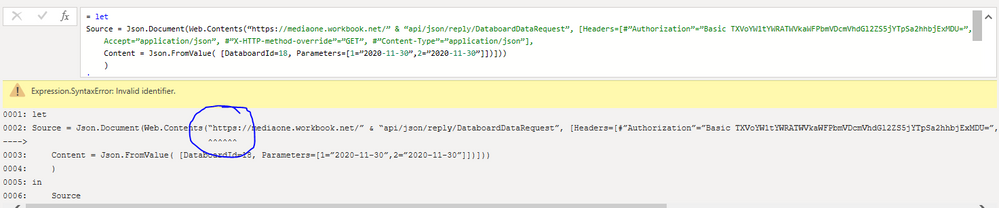
I am trying to pull data from our ERP database via an API. I had tested the API call with Postman and then took the basic authorization key from Postman and inserted it in the query in Power BI. However, the query in Power BI is giving the below error:
Expression.SyntaxError: Invalid identifier
The snippet of the error is below.
Highly appreciate it if somebody can help.
Solved! Go to Solution.
@Anonymous
Can you try replacing those open and close quotations using your keyboard for "
________________________
If my answer was helpful, please click Accept it as the solution to help other members find it useful
Click on the Thumbs-Up icon if you like this reply 🙂
⭕ Subscribe and learn Power BI from these videos
⚪ Website ⚪ LinkedIn ⚪ PBI User Group
@Anonymous
Can you try replacing those open and close quotations using your keyboard for "
________________________
If my answer was helpful, please click Accept it as the solution to help other members find it useful
Click on the Thumbs-Up icon if you like this reply 🙂
⭕ Subscribe and learn Power BI from these videos
⚪ Website ⚪ LinkedIn ⚪ PBI User Group
Hi Fowmy,
I tried replacing them with " but it gives an error as below:
Hi @Fowmy
I figured that out and finally fixed the syntax errors. However, now I face another issue. The error snapshot is attached.
Appreciate if you can please help.
Thanks....
If you have recently started exploring Fabric, we'd love to hear how it's going. Your feedback can help with product improvements.
A new Power BI DataViz World Championship is coming this June! Don't miss out on submitting your entry.
Share feedback directly with Fabric product managers, participate in targeted research studies and influence the Fabric roadmap.
| User | Count |
|---|---|
| 5 | |
| 3 | |
| 3 | |
| 2 | |
| 2 |
| User | Count |
|---|---|
| 11 | |
| 10 | |
| 7 | |
| 6 | |
| 5 |