

This is best Fabric, Power BI, SQL and AI community event. How do we know? The last event sold out! Save €200 with code FABCMTY200.
Register nowA new Data Days event is coming soon! This time we’re going bigger than ever. Fabric, Power BI, SQL, AI and more. Don't miss out.
Hi,
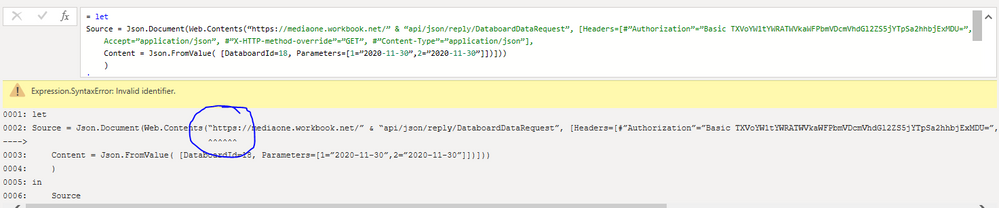
I am trying to pull data from our ERP database via an API. I had tested the API call with Postman and then took the basic authorization key from Postman and inserted it in the query in Power BI. However, the query in Power BI is giving the below error:
Expression.SyntaxError: Invalid identifier
The snippet of the error is below.
Highly appreciate it if somebody can help.
Solved! Go to Solution.
@Anonymous
Can you try replacing those open and close quotations using your keyboard for "
________________________
If my answer was helpful, please click Accept it as the solution to help other members find it useful
Click on the Thumbs-Up icon if you like this reply 🙂
⭕ Subscribe and learn Power BI from these videos
⚪ Website ⚪ LinkedIn ⚪ PBI User Group
@Anonymous
Can you try replacing those open and close quotations using your keyboard for "
________________________
If my answer was helpful, please click Accept it as the solution to help other members find it useful
Click on the Thumbs-Up icon if you like this reply 🙂
⭕ Subscribe and learn Power BI from these videos
⚪ Website ⚪ LinkedIn ⚪ PBI User Group
Hi Fowmy,
I tried replacing them with " but it gives an error as below:
Hi @Fowmy
I figured that out and finally fixed the syntax errors. However, now I face another issue. The error snapshot is attached.
Appreciate if you can please help.
Thanks....
Check out the May 2026 Power BI update to learn about new features.
Sign up to receive a private message when registration opens and key events begin.
If you have recently started exploring Fabric, we'd love to hear how it's going. Your feedback can help with product improvements.