Join us at FabCon Atlanta from March 16 - 20, 2026, for the ultimate Fabric, Power BI, AI and SQL community-led event. Save $200 with code FABCOMM.
Register now!The Power BI Data Visualization World Championships is back! Get ahead of the game and start preparing now! Learn more
Hi,
I am using Power BI Desktop and want to set up a report using data from a Salesforce Object.
When selecting: Get Data -> Online Services -> Salesforce Objects the system lets me chose the object (in this case Installed Product), but afterwards the 'Preview is Evaluationg' circle turns and turns until it shows an error: "DataSource.Error: Unable to connect to the remote server Details: https://na2.salesforce.com/services/data/v29.0/sobjects/SVMXC__Installed_Product__c/describe"
When I open the link the following is shown:
The strange thing is that I can work with other objects without error messages, and can work with all reports too.
Any advice would be greatly appreciated.
Hi @Katrin620 were you able to find a solution? As a workaround, maybe you can try to test your connection with a 3rd party connector. I've tried windsor.ai, supermetrics and funnel.io. I stayed with windsor because it is much cheaper so just to let you know other options. In case you wonder, to make the connection first search for the Salesforce connector in the data sources list:
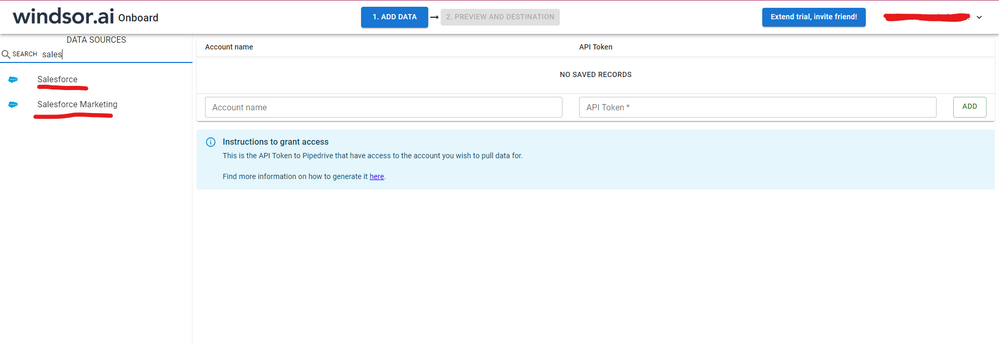
After that, just grant access to your Salesforce account using your credentials, then on preview and destination page you will see a preview of your Salesforce fields:
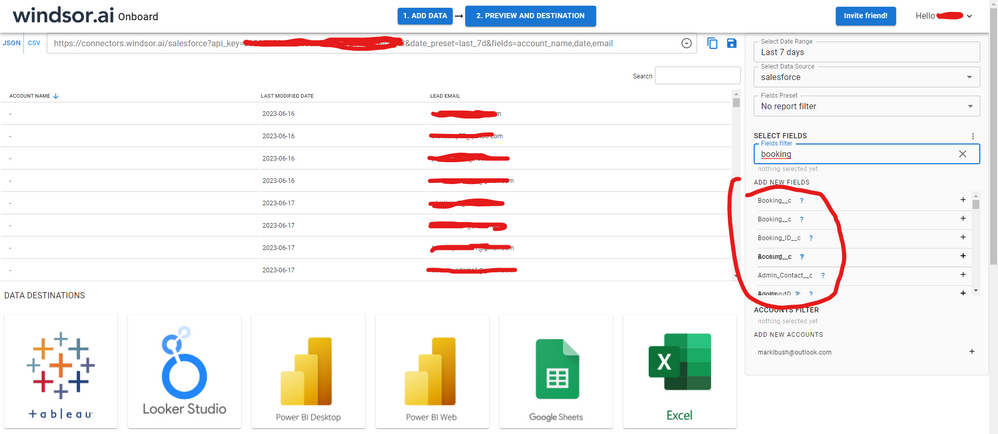
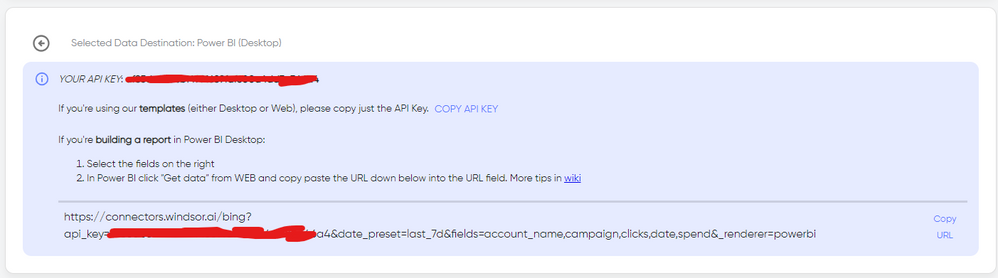
There just select the fields you need. It is also compatible with custom fields and custom objects, so you'll be able to export them through windsor. Finally, just select PBI as your data destination and finally just copy and paste the url on PBI --> Get Data --> Web --> Paste the url.
Hi Katrin,
while working with power BI and getting data from salesforce object I experience the same as you have described.
I also raised another ticket with the same content @Anonymous
Looking at the time and date you have raised the question do you have a solution?
Thank you !
Stijn Janssen
I get this error frequently when I am behind our company's firewall on our internal network. I don't seem to have this problem when on an external network. And I think the reason why querying some objects work fine and others do not has to do with the number of fields in the objects.
Hope this helps.
The Power BI Data Visualization World Championships is back! Get ahead of the game and start preparing now!
| User | Count |
|---|---|
| 19 | |
| 10 | |
| 9 | |
| 7 | |
| 7 |