Learn from the best! Meet the four finalists headed to the FINALS of the Power BI Dataviz World Championships! Register now
Hi,
I am using an Excel file stored on Sharepoint site and I would like to keep the folder dynamic.
It currently hits an error during data refresh on Power BI Service.
Here is my code:
strFolder = TblFolder{0}[Data Folder],
Source = Excel.Workbook(Web.Contents(strFolder & "Alibaba.xlsm"), null, true),
Appreciate your help.
hcze
Solved! Go to Solution.
@hcze
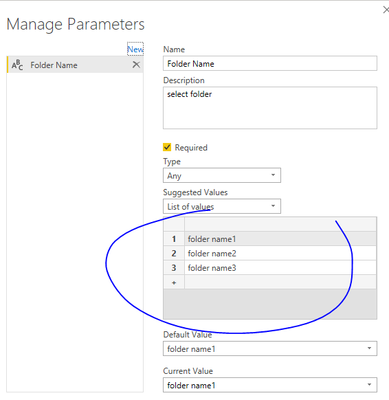
You can create a query parameter with foldernames. Then apply the parameter to code, make the str folder = the parameter name (Folder Name in the example). Something like:
strFolder = TblFolder{0}[Folder Name]
Source = Excel.Workbook(Web.Contents(strFolder & "Alibaba.xlsm"), null, true),
Paul Zheng _ Community Support Team
If this post helps, please Accept it as the solution to help the other members find it more quickly.
@hcze
You can create a query parameter with foldernames. Then apply the parameter to code, make the str folder = the parameter name (Folder Name in the example). Something like:
strFolder = TblFolder{0}[Folder Name]
Source = Excel.Workbook(Web.Contents(strFolder & "Alibaba.xlsm"), null, true),
Paul Zheng _ Community Support Team
If this post helps, please Accept it as the solution to help the other members find it more quickly.
| User | Count |
|---|---|
| 15 | |
| 8 | |
| 6 | |
| 5 | |
| 5 |