Join us at FabCon Atlanta from March 16 - 20, 2026, for the ultimate Fabric, Power BI, AI and SQL community-led event. Save $200 with code FABCOMM.
Register now!The Power BI Data Visualization World Championships is back! Get ahead of the game and start preparing now! Learn more
Hi,
I am using an Excel file stored on Sharepoint site and I would like to keep the folder dynamic.
It currently hits an error during data refresh on Power BI Service.
Here is my code:
strFolder = TblFolder{0}[Data Folder],
Source = Excel.Workbook(Web.Contents(strFolder & "Alibaba.xlsm"), null, true),
Appreciate your help.
hcze
Solved! Go to Solution.
@hcze
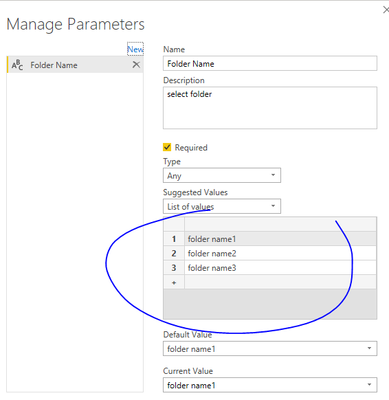
You can create a query parameter with foldernames. Then apply the parameter to code, make the str folder = the parameter name (Folder Name in the example). Something like:
strFolder = TblFolder{0}[Folder Name]
Source = Excel.Workbook(Web.Contents(strFolder & "Alibaba.xlsm"), null, true),
Paul Zheng _ Community Support Team
If this post helps, please Accept it as the solution to help the other members find it more quickly.
@hcze
You can create a query parameter with foldernames. Then apply the parameter to code, make the str folder = the parameter name (Folder Name in the example). Something like:
strFolder = TblFolder{0}[Folder Name]
Source = Excel.Workbook(Web.Contents(strFolder & "Alibaba.xlsm"), null, true),
Paul Zheng _ Community Support Team
If this post helps, please Accept it as the solution to help the other members find it more quickly.
The Power BI Data Visualization World Championships is back! Get ahead of the game and start preparing now!