Get certified for free when you join Fabric Data Days 2026 and dive into Fabric, Power BI, SQL, AI, and other essential data skills.
Join nowJuly 28 - August 9 | Final Round of the Power BI Dataviz World Championships. This is your chance. Learn more
Hi,
I am using an Excel file stored on Sharepoint site and I would like to keep the folder dynamic.
It currently hits an error during data refresh on Power BI Service.
Here is my code:
strFolder = TblFolder{0}[Data Folder],
Source = Excel.Workbook(Web.Contents(strFolder & "Alibaba.xlsm"), null, true),
Appreciate your help.
hcze
Solved! Go to Solution.
@hcze
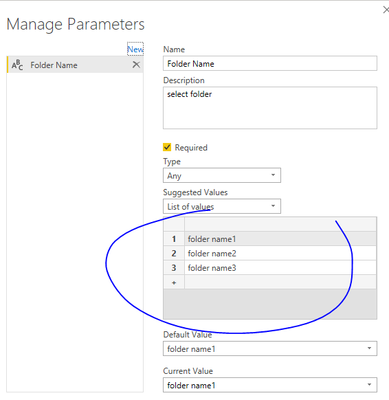
You can create a query parameter with foldernames. Then apply the parameter to code, make the str folder = the parameter name (Folder Name in the example). Something like:
strFolder = TblFolder{0}[Folder Name]
Source = Excel.Workbook(Web.Contents(strFolder & "Alibaba.xlsm"), null, true),
Paul Zheng _ Community Support Team
If this post helps, please Accept it as the solution to help the other members find it more quickly.
@hcze
You can create a query parameter with foldernames. Then apply the parameter to code, make the str folder = the parameter name (Folder Name in the example). Something like:
strFolder = TblFolder{0}[Folder Name]
Source = Excel.Workbook(Web.Contents(strFolder & "Alibaba.xlsm"), null, true),
Paul Zheng _ Community Support Team
If this post helps, please Accept it as the solution to help the other members find it more quickly.
If you love stickers, then you will definitely want to check out our community sticker challenge, Barcelona edition!
Check out the July 2026 Power BI update to learn about new features.
| User | Count |
|---|---|
| 4 | |
| 2 | |
| 2 | |
| 2 | |
| 1 |