This is best Fabric, Power BI, SQL and AI community event. How do we know? The last event sold out! Save €200 with code FABCMTY200.
Register nowA new Data Days event is coming soon! This time we’re going bigger than ever. Fabric, Power BI, SQL, AI and more. Don't miss out.
Hi All,
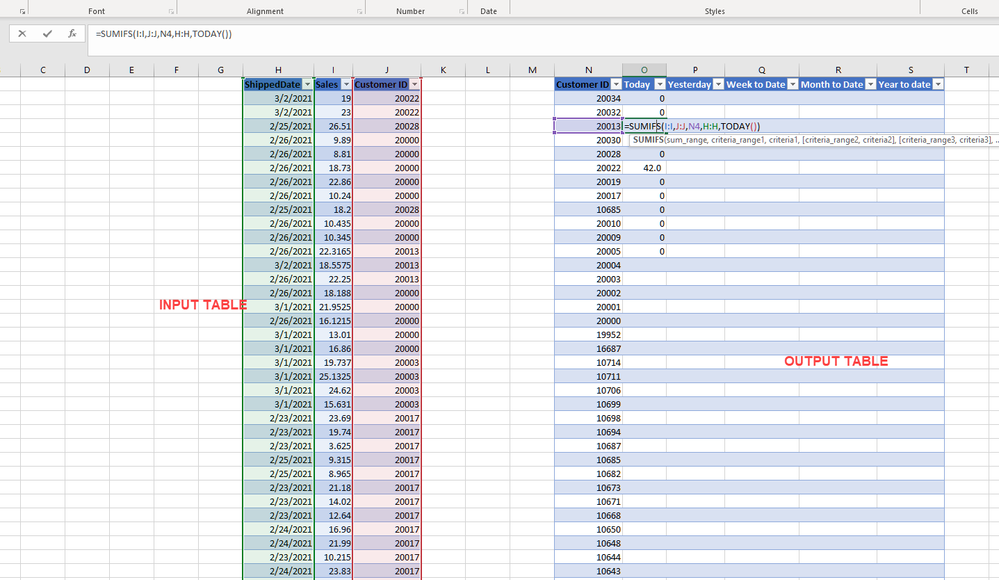
I have a table with date , quantity and customer ID.
The output table needs to have
I used PREVIUOSDAY for yesterday, but its giving incorrect result. :
How should I create seperate query for each of the five above. Or should it be a calculated colum. Please help me out, for this urgent Deliv.
Solved! Go to Solution.
Hi, @Anonymous
Based on your description, I created data to reproduce your scenario. The pbix file is attached in the end.
Table:
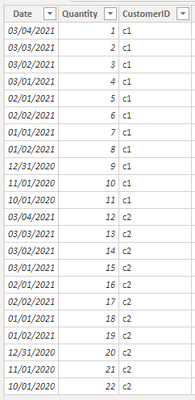
You may create measures as below.
Today Qty =
CALCULATE(
SUM('Table'[Quantity]),
FILTER(
ALLEXCEPT('Table','Table'[CustomerID]),
[Date]=TODAY()
)
)Yesterday Qty =
CALCULATE(
SUM('Table'[Quantity]),
FILTER(
ALLEXCEPT('Table','Table'[CustomerID]),
[Date]=TODAY()-1
)
)WTD Qty =
CALCULATE(
SUM('Table'[Quantity]),
FILTER(
ALLEXCEPT('Table','Table'[CustomerID]),
YEAR([Date])*100+WEEKNUM([Date])=YEAR(TODAY())*100+WEEKNUM(TODAY())&&
[Date]<=TODAY()
)
)MTD Qty =
CALCULATE(
SUM('Table'[Quantity]),
FILTER(
ALLEXCEPT('Table','Table'[CustomerID]),
YEAR([Date])*100+MONTH([Date])=YEAR(TODAY())*100+Month(TODAY())&&
[Date]<=TODAY()
)
)YTD Qty =
CALCULATE(
SUM('Table'[Quantity]),
FILTER(
ALLEXCEPT('Table','Table'[CustomerID]),
YEAR([Date])=YEAR(TODAY())&&
[Date]<=TODAY()
)
)
Result:
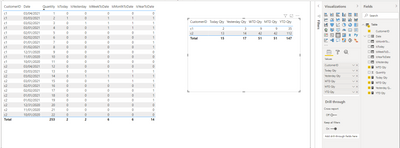
You may remove the calculated columns. They are created just for clear distinction. Today is 3/3/2021.
Best Regards
Allan
If this post helps, then please consider Accept it as the solution to help the other members find it more quickly.
Hi, @Anonymous
Based on your description, I created data to reproduce your scenario. The pbix file is attached in the end.
Table:
You may create measures as below.
Today Qty =
CALCULATE(
SUM('Table'[Quantity]),
FILTER(
ALLEXCEPT('Table','Table'[CustomerID]),
[Date]=TODAY()
)
)Yesterday Qty =
CALCULATE(
SUM('Table'[Quantity]),
FILTER(
ALLEXCEPT('Table','Table'[CustomerID]),
[Date]=TODAY()-1
)
)WTD Qty =
CALCULATE(
SUM('Table'[Quantity]),
FILTER(
ALLEXCEPT('Table','Table'[CustomerID]),
YEAR([Date])*100+WEEKNUM([Date])=YEAR(TODAY())*100+WEEKNUM(TODAY())&&
[Date]<=TODAY()
)
)MTD Qty =
CALCULATE(
SUM('Table'[Quantity]),
FILTER(
ALLEXCEPT('Table','Table'[CustomerID]),
YEAR([Date])*100+MONTH([Date])=YEAR(TODAY())*100+Month(TODAY())&&
[Date]<=TODAY()
)
)YTD Qty =
CALCULATE(
SUM('Table'[Quantity]),
FILTER(
ALLEXCEPT('Table','Table'[CustomerID]),
YEAR([Date])=YEAR(TODAY())&&
[Date]<=TODAY()
)
)
Result:
You may remove the calculated columns. They are created just for clear distinction. Today is 3/3/2021.
Best Regards
Allan
If this post helps, then please consider Accept it as the solution to help the other members find it more quickly.
Thanks a lot for help!
@Anonymous you need a DateTbl to start with in order for DAX to perform all time intelligence calculation.
For now, you can do the following to return the first two
_shippedToday:= CALCULATE(SUM('Table'[Column1]),FILTER('Table','Table'[date]=TODAY()))
_shippedYesterday = CALCULATE(SUM('Table'[Column1]),FILTER('Table','Table'[date]=TODAY()-1))
Check out the May 2026 Power BI update to learn about new features.
Sign up to receive a private message when registration opens and key events begin.
If you have recently started exploring Fabric, we'd love to hear how it's going. Your feedback can help with product improvements.
| User | Count |
|---|---|
| 4 | |
| 3 | |
| 2 | |
| 2 | |
| 1 |