cancel
Showing results for 
Search instead for 
Did you mean: 

The Power BI Data Visualization World Championships is back! Get ahead of the game and start preparing now! Learn more

Reply
meklund
Frequent Visitor

Distributing values from List

Hello!

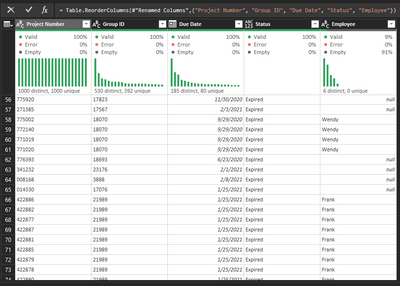
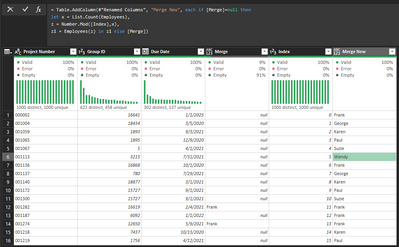
I have a list of 'projects' that have employee's assigned to them from a merged Group ID query. My issue is I need to replace all the nulls in the Employee column with names from the 'Employee' list I have, and the names should appear an equal amount of times when all is said and done. Can probalby be accomplished in Powerpivot, but is it possible in Power Query. Screenshots attached for reference. thank you.   


Screenshot 2021-03-01 125635.pngScreenshot 2021-03-01 125604.png


1 ACCEPTED SOLUTION

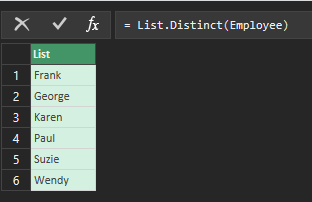
@meklundcan you please give this a try

let
    LookupTable=let
    Source = Table.FromRows(Json.Document(Binary.Decompress(Binary.FromText("i45W8jNU0lEyVIrVATKNgEwjCNMYyDRWio0FAA==", BinaryEncoding.Base64), Compression.Deflate)), let _t = ((type nullable text) meta [Serialized.Text = true]) in type table [Column1 = _t, Index = _t]),
    #"Changed Type" = Table.TransformColumnTypes(Source,{{"Column1", type text}, {"Index", Int64.Type}})
in
    #"Changed Type",
    Source = Table.FromRows(Json.Document(Binary.Decompress(Binary.FromText("i45W8jNU0lEyNDBQitUBcoyAHGMoB8g0gbNMEYJmCKY5TJ8xkGMB45gAOZYIRYYGOE2JBQA=", BinaryEncoding.Base64), Compression.Deflate)), let _t = ((type nullable text) meta [Serialized.Text = true]) in type table [Name = _t, val = _t]),
    #"Changed Type" = Table.TransformColumnTypes(Source,{{"Name", type text}, {"val", Int64.Type}}),
    #"Merged Queries" = Table.NestedJoin(#"Changed Type", {"Name"}, LookupTable, {"Column1"}, "index", JoinKind.LeftOuter),
    #"Expanded index" = Table.ExpandTableColumn(#"Merged Queries", "index", {"Column1"}, {"Column1"}),
    #"Added Index1" = Table.AddIndexColumn(#"Expanded index", "Index.1", 0, 1, Int64.Type),
    #"Added Custom" = Table.AddColumn(#"Added Index1", "Custom", each if [Column1]=null then
let x=List.Count(LookupTable[Column1]),
    z = Number.Mod([Index.1],x),
    z1 = LookupTable[Column1]{z} in z1 else [Column1]),
    #"Renamed Columns" = Table.RenameColumns(#"Added Custom",{{"Column1", "MergedValue"}, {"Custom", "ConditionalValue"}})
in
    #"Renamed Columns"
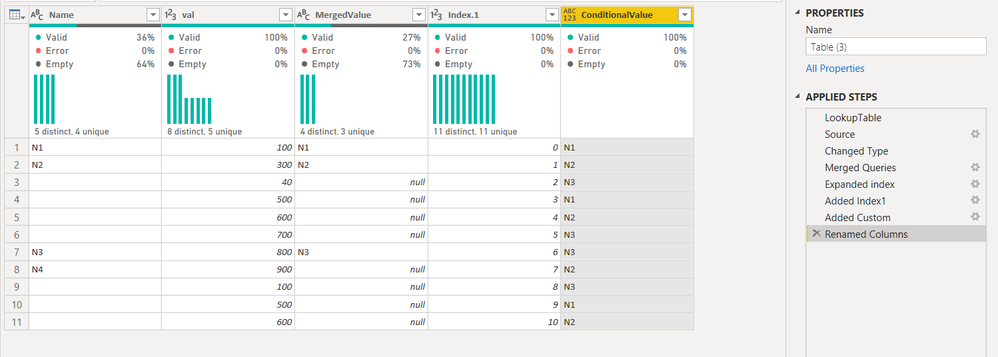
 

Capture.PNG

Did I answer your question? Mark my post as a solution!
Proud to be a Super User!
My custom visualization projects
Plotting Live Sound: Viz1
Beautiful News:Viz1, Viz2, Viz3
Visual Capitalist: Working Hrs

View solution in original post

5 REPLIES 5
meklund
Frequent Visitor

Most of the binary steps went over my head 😅 but I was able to adapt everything after the index and got what I needed. Thank you very much!!

mahoneypat
Microsoft Employee
Microsoft Employee

Are you wanting to randomly assign employees to Projects that have blanks in the Employee column?  If not, please explain the logic needed to fill in blank values (the list shown only has Employee names, not project assignments).


Pat


Did I answer your question? Mark my post as a solution! Kudos are also appreciated!

To learn more about Power BI, follow me on Twitter or subscribe on YouTube.


@mahoneypa HoosierBI on YouTube


Correct. Names can be assigned randomly to blank values in the Employee column, the result being that the count of names already merged plus the ones we are randomly assigning to blank rows are distibuted as equally as possible. Thanks for the help!

@meklundcan you please give this a try

let
    LookupTable=let
    Source = Table.FromRows(Json.Document(Binary.Decompress(Binary.FromText("i45W8jNU0lEyVIrVATKNgEwjCNMYyDRWio0FAA==", BinaryEncoding.Base64), Compression.Deflate)), let _t = ((type nullable text) meta [Serialized.Text = true]) in type table [Column1 = _t, Index = _t]),
    #"Changed Type" = Table.TransformColumnTypes(Source,{{"Column1", type text}, {"Index", Int64.Type}})
in
    #"Changed Type",
    Source = Table.FromRows(Json.Document(Binary.Decompress(Binary.FromText("i45W8jNU0lEyNDBQitUBcoyAHGMoB8g0gbNMEYJmCKY5TJ8xkGMB45gAOZYIRYYGOE2JBQA=", BinaryEncoding.Base64), Compression.Deflate)), let _t = ((type nullable text) meta [Serialized.Text = true]) in type table [Name = _t, val = _t]),
    #"Changed Type" = Table.TransformColumnTypes(Source,{{"Name", type text}, {"val", Int64.Type}}),
    #"Merged Queries" = Table.NestedJoin(#"Changed Type", {"Name"}, LookupTable, {"Column1"}, "index", JoinKind.LeftOuter),
    #"Expanded index" = Table.ExpandTableColumn(#"Merged Queries", "index", {"Column1"}, {"Column1"}),
    #"Added Index1" = Table.AddIndexColumn(#"Expanded index", "Index.1", 0, 1, Int64.Type),
    #"Added Custom" = Table.AddColumn(#"Added Index1", "Custom", each if [Column1]=null then
let x=List.Count(LookupTable[Column1]),
    z = Number.Mod([Index.1],x),
    z1 = LookupTable[Column1]{z} in z1 else [Column1]),
    #"Renamed Columns" = Table.RenameColumns(#"Added Custom",{{"Column1", "MergedValue"}, {"Custom", "ConditionalValue"}})
in
    #"Renamed Columns"
 

Capture.PNG

Did I answer your question? Mark my post as a solution!
Proud to be a Super User!
My custom visualization projects
Plotting Live Sound: Viz1
Beautiful News:Viz1, Viz2, Viz3
Visual Capitalist: Working Hrs

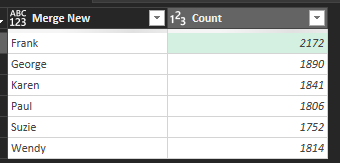
Followup question.  The 'New Merge' I did gave some employees higher numbers since they already had more in the inital merge. Is there a way to even this out and maybe skip a name if it appears higher than the average between all employees? Thanks again!!!

meklund_0-1614799479531.png

meklund_1-1614799592004.png


Helpful resources

Announcements
Power BI DataViz World Championships

Power BI Dataviz World Championships

The Power BI Data Visualization World Championships is back! Get ahead of the game and start preparing now!

December 2025 Power BI Update Carousel

Power BI Monthly Update - December 2025

Check out the December 2025 Power BI Holiday Recap!

FabCon Atlanta 2026 carousel

FabCon Atlanta 2026

Join us at FabCon Atlanta, March 16-20, for the ultimate Fabric, Power BI, AI and SQL community-led event. Save $200 with code FABCOMM.

Top Solution Authors