Join us at FabCon Atlanta from March 16 - 20, 2026, for the ultimate Fabric, Power BI, AI and SQL community-led event. Save $200 with code FABCOMM.
Register now!The Power BI Data Visualization World Championships is back! Get ahead of the game and start preparing now! Learn more
Hi All,
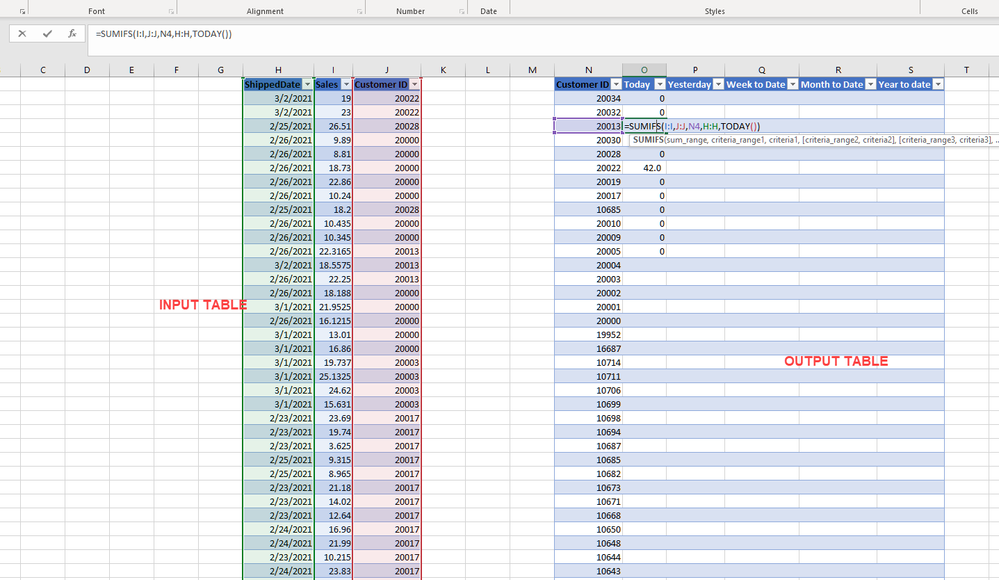
I have a table with date , quantity and customer ID.
The output table needs to have
I used PREVIUOSDAY for yesterday, but its giving incorrect result. :
How should I create seperate query for each of the five above. Or should it be a calculated colum. Please help me out, for this urgent Deliv.
Solved! Go to Solution.
Hi, @Anonymous
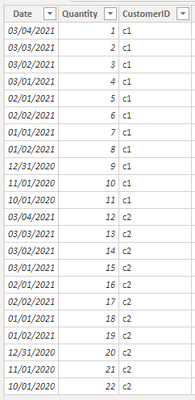
Based on your description, I created data to reproduce your scenario. The pbix file is attached in the end.
Table:
You may create measures as below.
Today Qty =
CALCULATE(
SUM('Table'[Quantity]),
FILTER(
ALLEXCEPT('Table','Table'[CustomerID]),
[Date]=TODAY()
)
)Yesterday Qty =
CALCULATE(
SUM('Table'[Quantity]),
FILTER(
ALLEXCEPT('Table','Table'[CustomerID]),
[Date]=TODAY()-1
)
)WTD Qty =
CALCULATE(
SUM('Table'[Quantity]),
FILTER(
ALLEXCEPT('Table','Table'[CustomerID]),
YEAR([Date])*100+WEEKNUM([Date])=YEAR(TODAY())*100+WEEKNUM(TODAY())&&
[Date]<=TODAY()
)
)MTD Qty =
CALCULATE(
SUM('Table'[Quantity]),
FILTER(
ALLEXCEPT('Table','Table'[CustomerID]),
YEAR([Date])*100+MONTH([Date])=YEAR(TODAY())*100+Month(TODAY())&&
[Date]<=TODAY()
)
)YTD Qty =
CALCULATE(
SUM('Table'[Quantity]),
FILTER(
ALLEXCEPT('Table','Table'[CustomerID]),
YEAR([Date])=YEAR(TODAY())&&
[Date]<=TODAY()
)
)
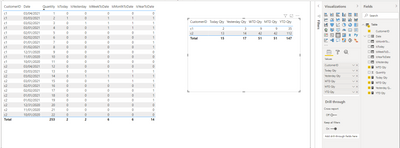
Result:
You may remove the calculated columns. They are created just for clear distinction. Today is 3/3/2021.
Best Regards
Allan
If this post helps, then please consider Accept it as the solution to help the other members find it more quickly.
Hi, @Anonymous
Based on your description, I created data to reproduce your scenario. The pbix file is attached in the end.
Table:
You may create measures as below.
Today Qty =
CALCULATE(
SUM('Table'[Quantity]),
FILTER(
ALLEXCEPT('Table','Table'[CustomerID]),
[Date]=TODAY()
)
)Yesterday Qty =
CALCULATE(
SUM('Table'[Quantity]),
FILTER(
ALLEXCEPT('Table','Table'[CustomerID]),
[Date]=TODAY()-1
)
)WTD Qty =
CALCULATE(
SUM('Table'[Quantity]),
FILTER(
ALLEXCEPT('Table','Table'[CustomerID]),
YEAR([Date])*100+WEEKNUM([Date])=YEAR(TODAY())*100+WEEKNUM(TODAY())&&
[Date]<=TODAY()
)
)MTD Qty =
CALCULATE(
SUM('Table'[Quantity]),
FILTER(
ALLEXCEPT('Table','Table'[CustomerID]),
YEAR([Date])*100+MONTH([Date])=YEAR(TODAY())*100+Month(TODAY())&&
[Date]<=TODAY()
)
)YTD Qty =
CALCULATE(
SUM('Table'[Quantity]),
FILTER(
ALLEXCEPT('Table','Table'[CustomerID]),
YEAR([Date])=YEAR(TODAY())&&
[Date]<=TODAY()
)
)
Result:
You may remove the calculated columns. They are created just for clear distinction. Today is 3/3/2021.
Best Regards
Allan
If this post helps, then please consider Accept it as the solution to help the other members find it more quickly.
Thanks a lot for help!
@Anonymous you need a DateTbl to start with in order for DAX to perform all time intelligence calculation.
For now, you can do the following to return the first two
_shippedToday:= CALCULATE(SUM('Table'[Column1]),FILTER('Table','Table'[date]=TODAY()))
_shippedYesterday = CALCULATE(SUM('Table'[Column1]),FILTER('Table','Table'[date]=TODAY()-1))
The Power BI Data Visualization World Championships is back! Get ahead of the game and start preparing now!
| User | Count |
|---|---|
| 19 | |
| 10 | |
| 9 | |
| 7 | |
| 6 |