Learn from the best! Meet the four finalists headed to the FINALS of the Power BI Dataviz World Championships! Register now
Hi All,
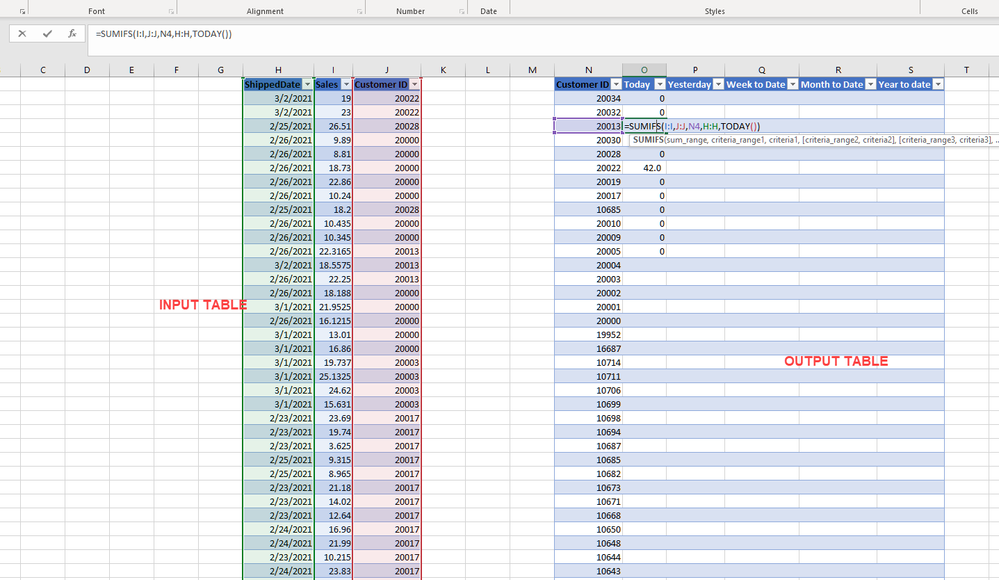
I have a table with date , quantity and customer ID.
The output table needs to have
I used PREVIUOSDAY for yesterday, but its giving incorrect result. :
How should I create seperate query for each of the five above. Or should it be a calculated colum. Please help me out, for this urgent Deliv.
Solved! Go to Solution.
Hi, @Anonymous
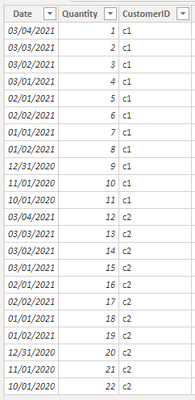
Based on your description, I created data to reproduce your scenario. The pbix file is attached in the end.
Table:
You may create measures as below.
Today Qty =
CALCULATE(
SUM('Table'[Quantity]),
FILTER(
ALLEXCEPT('Table','Table'[CustomerID]),
[Date]=TODAY()
)
)Yesterday Qty =
CALCULATE(
SUM('Table'[Quantity]),
FILTER(
ALLEXCEPT('Table','Table'[CustomerID]),
[Date]=TODAY()-1
)
)WTD Qty =
CALCULATE(
SUM('Table'[Quantity]),
FILTER(
ALLEXCEPT('Table','Table'[CustomerID]),
YEAR([Date])*100+WEEKNUM([Date])=YEAR(TODAY())*100+WEEKNUM(TODAY())&&
[Date]<=TODAY()
)
)MTD Qty =
CALCULATE(
SUM('Table'[Quantity]),
FILTER(
ALLEXCEPT('Table','Table'[CustomerID]),
YEAR([Date])*100+MONTH([Date])=YEAR(TODAY())*100+Month(TODAY())&&
[Date]<=TODAY()
)
)YTD Qty =
CALCULATE(
SUM('Table'[Quantity]),
FILTER(
ALLEXCEPT('Table','Table'[CustomerID]),
YEAR([Date])=YEAR(TODAY())&&
[Date]<=TODAY()
)
)
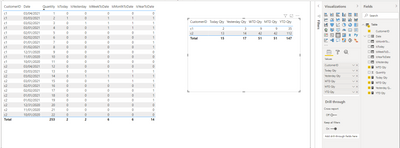
Result:
You may remove the calculated columns. They are created just for clear distinction. Today is 3/3/2021.
Best Regards
Allan
If this post helps, then please consider Accept it as the solution to help the other members find it more quickly.
Hi, @Anonymous
Based on your description, I created data to reproduce your scenario. The pbix file is attached in the end.
Table:
You may create measures as below.
Today Qty =
CALCULATE(
SUM('Table'[Quantity]),
FILTER(
ALLEXCEPT('Table','Table'[CustomerID]),
[Date]=TODAY()
)
)Yesterday Qty =
CALCULATE(
SUM('Table'[Quantity]),
FILTER(
ALLEXCEPT('Table','Table'[CustomerID]),
[Date]=TODAY()-1
)
)WTD Qty =
CALCULATE(
SUM('Table'[Quantity]),
FILTER(
ALLEXCEPT('Table','Table'[CustomerID]),
YEAR([Date])*100+WEEKNUM([Date])=YEAR(TODAY())*100+WEEKNUM(TODAY())&&
[Date]<=TODAY()
)
)MTD Qty =
CALCULATE(
SUM('Table'[Quantity]),
FILTER(
ALLEXCEPT('Table','Table'[CustomerID]),
YEAR([Date])*100+MONTH([Date])=YEAR(TODAY())*100+Month(TODAY())&&
[Date]<=TODAY()
)
)YTD Qty =
CALCULATE(
SUM('Table'[Quantity]),
FILTER(
ALLEXCEPT('Table','Table'[CustomerID]),
YEAR([Date])=YEAR(TODAY())&&
[Date]<=TODAY()
)
)
Result:
You may remove the calculated columns. They are created just for clear distinction. Today is 3/3/2021.
Best Regards
Allan
If this post helps, then please consider Accept it as the solution to help the other members find it more quickly.
Thanks a lot for help!
@Anonymous you need a DateTbl to start with in order for DAX to perform all time intelligence calculation.
For now, you can do the following to return the first two
_shippedToday:= CALCULATE(SUM('Table'[Column1]),FILTER('Table','Table'[date]=TODAY()))
_shippedYesterday = CALCULATE(SUM('Table'[Column1]),FILTER('Table','Table'[date]=TODAY()-1))
A new Power BI DataViz World Championship is coming this June! Don't miss out on submitting your entry.
Share feedback directly with Fabric product managers, participate in targeted research studies and influence the Fabric roadmap.
| User | Count |
|---|---|
| 5 | |
| 4 | |
| 4 | |
| 3 | |
| 3 |
| User | Count |
|---|---|
| 11 | |
| 10 | |
| 8 | |
| 7 | |
| 5 |