Get certified for free when you join Fabric Data Days 2026 and dive into Fabric, Power BI, SQL, AI, and other essential data skills.
Join nowJuly 7 - July 17 | Round 2 of the Power BI Dataviz World Championships. Don't miss your chance! Learn more
Hello everyone,
I'm working on a query and I would convert a date column type text to a date format and I have this error message :
DataFormat.Error: Sorry ... We were unable to parse the input provided to a Date value.
Details:
April-19Do you have any tips to solve this issue?
Thank you for your answer.
Solved! Go to Solution.
Hi @Anonymous
= Table.AddColumn(Source, "Date (Date format)", each Date.FromText("01-" & Text.End([#"Date (text format)"],3) & "-" & Text.Start([#"Date (text format)"],2)), type date)where Source needs to be replaced by a preceding step name.
Or from ribbon Add Column > Custom Column and use this formula:
Date.FromText("01-" & Text.End([#"Date (text format)"],3) & "-" & Text.Start([#"Date (text format)"],2))
Kind regards,
John
Hi Hicham,
You could try below M code to see whether it work or not.
let
Source = Table.FromRows(Json.Document(Binary.Decompress(Binary.FromText("i45WMrTQdSwoUorVATN9EyshTEtdr8Q8GNM3sQguWgoUjQUA", BinaryEncoding.Base64), Compression.Deflate)), let _t = ((type text) meta [Serialized.Text = true]) in type table [month = _t]),
#"Added Custom" = Table.AddColumn(Source, "Custom", each "20"&[month]&"-01"),
#"Changed Type" = Table.TransformColumnTypes(#"Added Custom",{{"Custom", type date}})
in
#"Changed Type"
Best Regards,
Zoe Zhi
If this post helps, then please consider Accept it as the solution to help the other members find it more quickly.
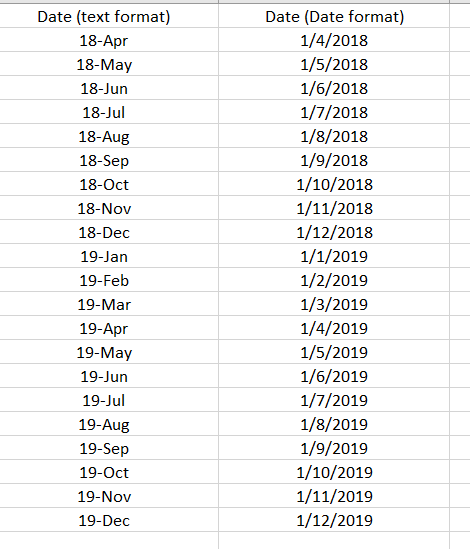
Hi, @Mariusz here a data sample:
For information, the data came from the CSV file.
the column Date (Date format) is the attending result.
regards,
Hi Hicham,
You could try below M code to see whether it work or not.
let
Source = Table.FromRows(Json.Document(Binary.Decompress(Binary.FromText("i45WMrTQdSwoUorVATN9EyshTEtdr8Q8GNM3sQguWgoUjQUA", BinaryEncoding.Base64), Compression.Deflate)), let _t = ((type text) meta [Serialized.Text = true]) in type table [month = _t]),
#"Added Custom" = Table.AddColumn(Source, "Custom", each "20"&[month]&"-01"),
#"Changed Type" = Table.TransformColumnTypes(#"Added Custom",{{"Custom", type date}})
in
#"Changed Type"
Best Regards,
Zoe Zhi
If this post helps, then please consider Accept it as the solution to help the other members find it more quickly.
Hi @Anonymous
= Table.AddColumn(Source, "Date (Date format)", each Date.FromText("01-" & Text.End([#"Date (text format)"],3) & "-" & Text.Start([#"Date (text format)"],2)), type date)where Source needs to be replaced by a preceding step name.
Or from ribbon Add Column > Custom Column and use this formula:
Date.FromText("01-" & Text.End([#"Date (text format)"],3) & "-" & Text.Start([#"Date (text format)"],2))
Kind regards,
John
Join us in Barcelona for FabCon and SQLCon, the Fabric, Power BI, SQL, and AI community event. Save €200 with code FABCMTY200.
If you love stickers, then you will definitely want to check out our community sticker challenge, Barcelona edition!
Check out the July 2026 Power BI update to learn about new features.