Don't miss your chance to take the Fabric Data Engineer (DP-600) exam for FREE! Find out how by attending the DP-600 session on April 23rd (pacific time), live or on-demand.
Learn moreNext up in the FabCon + SQLCon recap series: The roadmap for Microsoft SQL and Maximizing Developer experiences in Fabric. All sessions are available on-demand after the live show. Register now
Hello everyone,
I'm working on a query and I would convert a date column type text to a date format and I have this error message :
DataFormat.Error: Sorry ... We were unable to parse the input provided to a Date value.
Details:
April-19Do you have any tips to solve this issue?
Thank you for your answer.
Solved! Go to Solution.
Hi @Anonymous
= Table.AddColumn(Source, "Date (Date format)", each Date.FromText("01-" & Text.End([#"Date (text format)"],3) & "-" & Text.Start([#"Date (text format)"],2)), type date)where Source needs to be replaced by a preceding step name.
Or from ribbon Add Column > Custom Column and use this formula:
Date.FromText("01-" & Text.End([#"Date (text format)"],3) & "-" & Text.Start([#"Date (text format)"],2))
Kind regards,
John
Hi Hicham,
You could try below M code to see whether it work or not.
let
Source = Table.FromRows(Json.Document(Binary.Decompress(Binary.FromText("i45WMrTQdSwoUorVATN9EyshTEtdr8Q8GNM3sQguWgoUjQUA", BinaryEncoding.Base64), Compression.Deflate)), let _t = ((type text) meta [Serialized.Text = true]) in type table [month = _t]),
#"Added Custom" = Table.AddColumn(Source, "Custom", each "20"&[month]&"-01"),
#"Changed Type" = Table.TransformColumnTypes(#"Added Custom",{{"Custom", type date}})
in
#"Changed Type"
Best Regards,
Zoe Zhi
If this post helps, then please consider Accept it as the solution to help the other members find it more quickly.
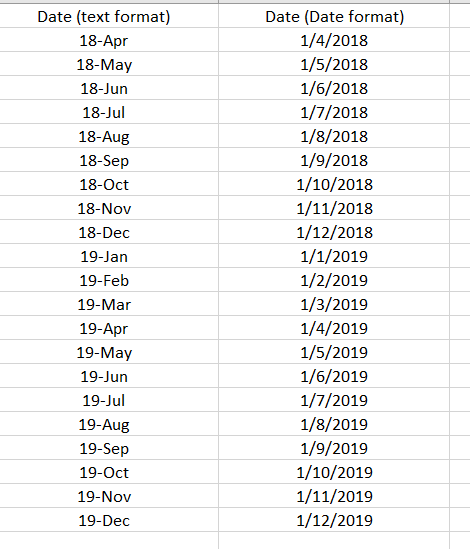
Hi, @Mariusz here a data sample:
For information, the data came from the CSV file.
the column Date (Date format) is the attending result.
regards,
Hi Hicham,
You could try below M code to see whether it work or not.
let
Source = Table.FromRows(Json.Document(Binary.Decompress(Binary.FromText("i45WMrTQdSwoUorVATN9EyshTEtdr8Q8GNM3sQguWgoUjQUA", BinaryEncoding.Base64), Compression.Deflate)), let _t = ((type text) meta [Serialized.Text = true]) in type table [month = _t]),
#"Added Custom" = Table.AddColumn(Source, "Custom", each "20"&[month]&"-01"),
#"Changed Type" = Table.TransformColumnTypes(#"Added Custom",{{"Custom", type date}})
in
#"Changed Type"
Best Regards,
Zoe Zhi
If this post helps, then please consider Accept it as the solution to help the other members find it more quickly.
Hi @Anonymous
= Table.AddColumn(Source, "Date (Date format)", each Date.FromText("01-" & Text.End([#"Date (text format)"],3) & "-" & Text.Start([#"Date (text format)"],2)), type date)where Source needs to be replaced by a preceding step name.
Or from ribbon Add Column > Custom Column and use this formula:
Date.FromText("01-" & Text.End([#"Date (text format)"],3) & "-" & Text.Start([#"Date (text format)"],2))
Kind regards,
John
If you have recently started exploring Fabric, we'd love to hear how it's going. Your feedback can help with product improvements.
A new Power BI DataViz World Championship is coming this June! Don't miss out on submitting your entry.
Share feedback directly with Fabric product managers, participate in targeted research studies and influence the Fabric roadmap.
| User | Count |
|---|---|
| 5 | |
| 3 | |
| 3 | |
| 3 | |
| 2 |