cancel
Showing results for 
Search instead for 
Did you mean: 

The Power BI Data Visualization World Championships is back! It's time to submit your entry. Live now!

Reply
Anonymous
Not applicable

Date format conversion issue

Hello everyone,

I'm working on a query and I would convert a date column type text to a date format and I have this error message :

DataFormat.Error: Sorry ... We were unable to parse the input provided to a Date value.

Details:

April-19

Do you have any tips to solve this issue?  

Thank you for your answer. 

2 ACCEPTED SOLUTIONS
Anonymous
Not applicable

Hi @Anonymous 


= Table.AddColumn(Source, "Date (Date format)", each Date.FromText("01-" & Text.End([#"Date (text format)"],3) & "-" & Text.Start([#"Date (text format)"],2)), type date)

where Source needs to be replaced by a preceding step name.


Or from ribbon Add Column > Custom Column and use this formula:

Date.FromText("01-" & Text.End([#"Date (text format)"],3) & "-" & Text.Start([#"Date (text format)"],2))


Kind regards,

John

View solution in original post

dax
Community Support
Community Support

Hi Hicham,

You could try below M code to see whether it work or not.

let
    Source = Table.FromRows(Json.Document(Binary.Decompress(Binary.FromText("i45WMrTQdSwoUorVATN9EyshTEtdr8Q8GNM3sQguWgoUjQUA", BinaryEncoding.Base64), Compression.Deflate)), let _t = ((type text) meta [Serialized.Text = true]) in type table [month = _t]),
    #"Added Custom" = Table.AddColumn(Source, "Custom", each "20"&[month]&"-01"),
    #"Changed Type" = Table.TransformColumnTypes(#"Added Custom",{{"Custom", type date}})
in
    #"Changed Type"


Best Regards,
Zoe Zhi

If this post helps, then please consider Accept it as the solution to help the other members find it more quickly.

View solution in original post

4 REPLIES 4
Mariusz
Community Champion
Community Champion

Hi @Anonymous 


Can you provide a data sample?


Best Regards,
Mariusz

If this post helps, then please consider Accepting it as the solution.

Please feel free to connect with me.
Mariusz Repczynski


Anonymous
Not applicable

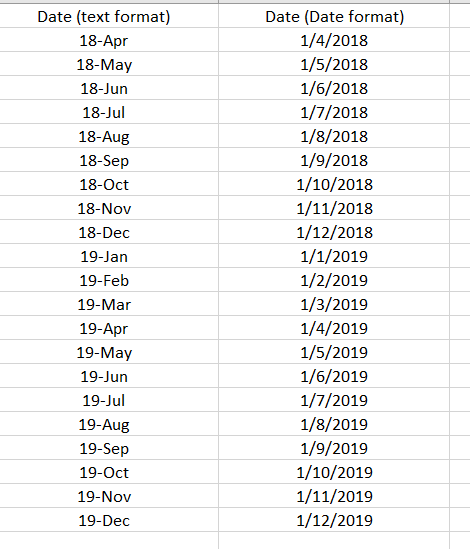
Hi, @Mariusz here a data sample:

For information, the data came from the CSV file. 

the column Date (Date format) is the attending result. 


cvd.PNG

regards, 


dax
Community Support
Community Support

Hi Hicham,

You could try below M code to see whether it work or not.

let
    Source = Table.FromRows(Json.Document(Binary.Decompress(Binary.FromText("i45WMrTQdSwoUorVATN9EyshTEtdr8Q8GNM3sQguWgoUjQUA", BinaryEncoding.Base64), Compression.Deflate)), let _t = ((type text) meta [Serialized.Text = true]) in type table [month = _t]),
    #"Added Custom" = Table.AddColumn(Source, "Custom", each "20"&[month]&"-01"),
    #"Changed Type" = Table.TransformColumnTypes(#"Added Custom",{{"Custom", type date}})
in
    #"Changed Type"


Best Regards,
Zoe Zhi

If this post helps, then please consider Accept it as the solution to help the other members find it more quickly.

Anonymous
Not applicable

Hi @Anonymous 


= Table.AddColumn(Source, "Date (Date format)", each Date.FromText("01-" & Text.End([#"Date (text format)"],3) & "-" & Text.Start([#"Date (text format)"],2)), type date)

where Source needs to be replaced by a preceding step name.


Or from ribbon Add Column > Custom Column and use this formula:

Date.FromText("01-" & Text.End([#"Date (text format)"],3) & "-" & Text.Start([#"Date (text format)"],2))


Kind regards,

John

Helpful resources

Announcements
Power BI DataViz World Championships

Power BI Dataviz World Championships

The Power BI Data Visualization World Championships is back! It's time to submit your entry.

FabCon Atlanta 2026 carousel

FabCon Atlanta 2026

Join us at FabCon Atlanta, March 16-20, for the ultimate Fabric, Power BI, AI and SQL community-led event. Save $200 with code FABCOMM.

Top Solution Authors