cancel
Showing results for 
Search instead for 
Did you mean: 

The Power BI Data Visualization World Championships is back! It's time to submit your entry. Live now!

Reply
Anonymous
Not applicable

Data Sources with Data Gateway

Hi everyone,


I create reports on my laptop and saves those reports on a network share from our company. The data sources for those reports are also on the shared folder, but when I connect to those files Power BI uses x:\foldername\filename.

Our on premise data gateway is installed on a dedicated server which also has access to these files, but trhough \\servername\foldername\filename. When I publish a report it will use x:\ path and I can't add that same path to the gateway. But when I use the path \\servername\.. I can't connect to the files in Power BI Desktop...


How can I make this work?


The connection with \\servername\ in de gateway is fine. But when I publish the Power BI desktop with the \\servername\ path, Power BI Service still sees it as x:\.

1 ACCEPTED SOLUTION
Anonymous
Not applicable

So it seemed to be that IT denied my access to those folders. They gave me access to the folder and I was able to use the UNC Path.

View solution in original post

2 REPLIES 2
Anonymous
Not applicable

So it seemed to be that IT denied my access to those folders. They gave me access to the folder and I was able to use the UNC Path.

Nolock
Resident Rockstar
Resident Rockstar

Hi @Anonymous,

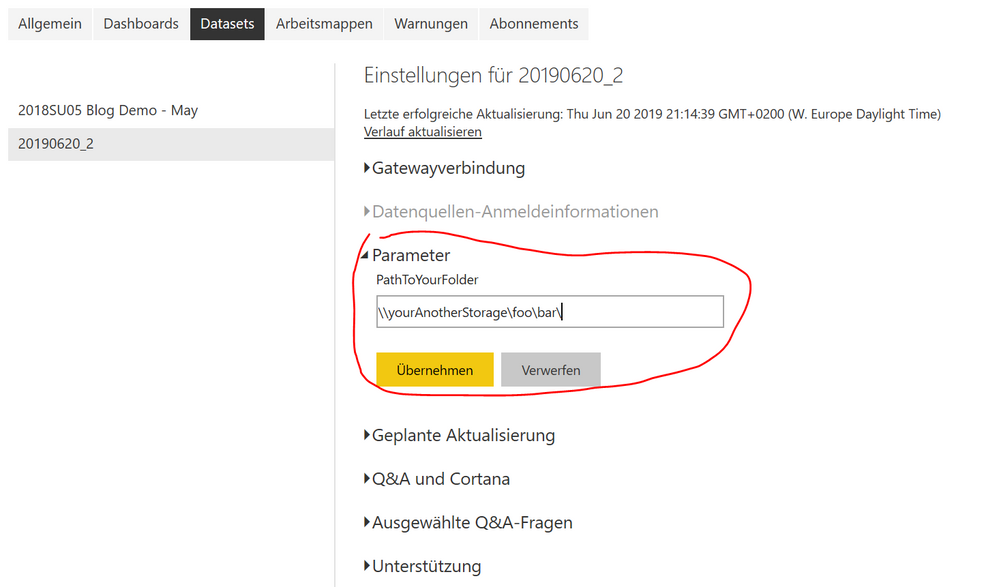
I'd like to recommend using parameters. You can create a parameter PathToYouStorage which you set in Power Query Editor to your x:\foo\bar\ and then you append the file name, see the screenshot.


Capture.PNG

Next, you load your file using the parameter like this:

let
    Source = Csv.Document(File.Contents(PathToYourFolder & "fileName.csv"),[Delimiter=",", Encoding=1252])
in
    Source

Then you publish you pbix to Power BI Service and change the parameter in the setting of your dataset.

Capture2.PNG


More to this topic: Deep Dive into Query Parameters and Power BI Templates


Helpful resources

Announcements
FabCon Atlanta 2026 carousel

FabCon Atlanta 2026

Join us at FabCon Atlanta, March 16-20, for the ultimate Fabric, Power BI, AI and SQL community-led event. Save $200 with code FABCOMM.