cancel
Showing results for 
Search instead for 
Did you mean: 

The Power BI Data Visualization World Championships is back! Get ahead of the game and start preparing now! Learn more

Reply
Anonymous
Not applicable

Data Sources with Data Gateway

Hi everyone,


I create reports on my laptop and saves those reports on a network share from our company. The data sources for those reports are also on the shared folder, but when I connect to those files Power BI uses x:\foldername\filename.

Our on premise data gateway is installed on a dedicated server which also has access to these files, but trhough \\servername\foldername\filename. When I publish a report it will use x:\ path and I can't add that same path to the gateway. But when I use the path \\servername\.. I can't connect to the files in Power BI Desktop...


How can I make this work?


The connection with \\servername\ in de gateway is fine. But when I publish the Power BI desktop with the \\servername\ path, Power BI Service still sees it as x:\.

1 ACCEPTED SOLUTION
Anonymous
Not applicable

So it seemed to be that IT denied my access to those folders. They gave me access to the folder and I was able to use the UNC Path.

View solution in original post

2 REPLIES 2
Anonymous
Not applicable

So it seemed to be that IT denied my access to those folders. They gave me access to the folder and I was able to use the UNC Path.

Nolock
Resident Rockstar
Resident Rockstar

Hi @Anonymous,

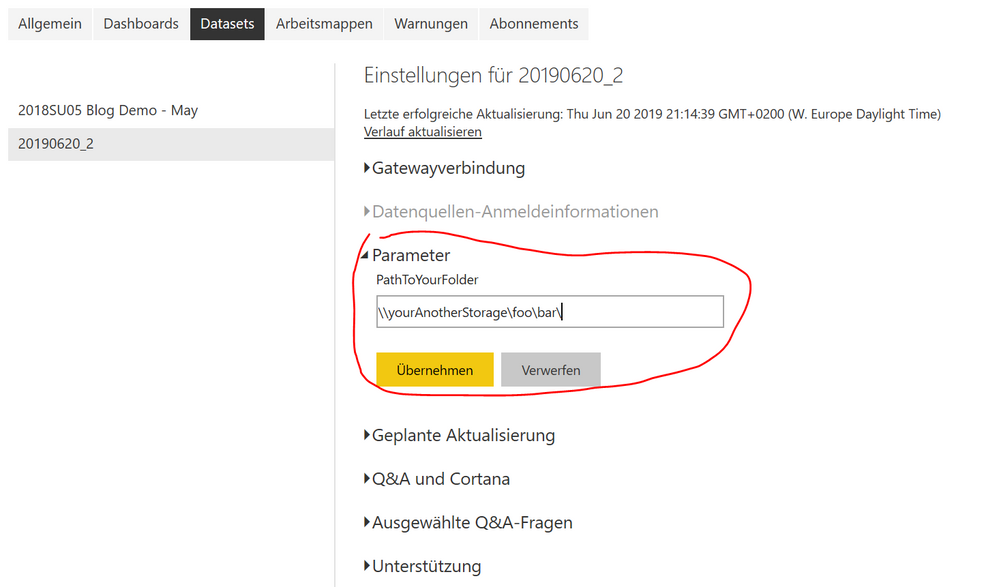
I'd like to recommend using parameters. You can create a parameter PathToYouStorage which you set in Power Query Editor to your x:\foo\bar\ and then you append the file name, see the screenshot.


Capture.PNG

Next, you load your file using the parameter like this:

let
    Source = Csv.Document(File.Contents(PathToYourFolder & "fileName.csv"),[Delimiter=",", Encoding=1252])
in
    Source

Then you publish you pbix to Power BI Service and change the parameter in the setting of your dataset.

Capture2.PNG


More to this topic: Deep Dive into Query Parameters and Power BI Templates


Helpful resources

Announcements
Power BI DataViz World Championships

Power BI Dataviz World Championships

The Power BI Data Visualization World Championships is back! Get ahead of the game and start preparing now!

December 2025 Power BI Update Carousel

Power BI Monthly Update - December 2025

Check out the December 2025 Power BI Holiday Recap!

FabCon Atlanta 2026 carousel

FabCon Atlanta 2026

Join us at FabCon Atlanta, March 16-20, for the ultimate Fabric, Power BI, AI and SQL community-led event. Save $200 with code FABCOMM.

Top Solution Authors