cancel
Showing results for 
Search instead for 
Did you mean: 

Try your skills in the Power BI Dataviz World Championship! Round one ends June 26. Join now

Reply
Anonymous
Not applicable

Conditionally Filtering Out Rows based on 2 Parameters in w/ Power Query

Hello,
 

I have a table similar to the one attached below:

 
AcctNumCenterNumDepCodeBalance
1234541110122450
1234411101257200
49291804222257400
3801384048592224100


What I would like to do, using power query, is conditionally filter out (remove) rows where CenterNum = 1101 and DepCode = 257. I figured Table.SelectRows()  would work but it doesn't and the query just returns, this table is empty. The #"Expanded AccountLookup" ,in my formula below, is referencing the power query applied step before the one I am trying to create. I'm hoping to get some input on how to remove rows based on these two paramters.

= Table.SelectRows(#"Expanded AccountLookup", each [CenterNum] = "1111001" and [DepCode] = "257")

Thank you!

1 ACCEPTED SOLUTION
jennratten
Super User
Super User

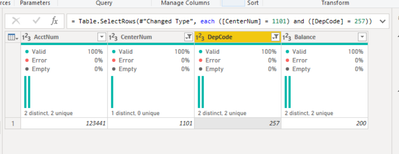
You were really close.  If CenterNum and DepCode are formatted as text columns then you would include the quotation marks as you have in your script - otherwise you would not include the quotation marks, but you have a few extra digits.  Instead of "1101" you have "1111001".  The paranthesis in the snip below were automatically added by Power Query in desktop, but they are optional in this scenario.

jennratten_0-1654054337213.png

= Table.SelectRows(#"Changed Type", each ([CenterNum] = 1101) and ([DepCode] = 257))


View solution in original post

3 REPLIES 3
Anonymous
Not applicable

Wow, thanks so much for the help!

You're very welcome!

jennratten
Super User
Super User

You were really close.  If CenterNum and DepCode are formatted as text columns then you would include the quotation marks as you have in your script - otherwise you would not include the quotation marks, but you have a few extra digits.  Instead of "1101" you have "1111001".  The paranthesis in the snip below were automatically added by Power Query in desktop, but they are optional in this scenario.

jennratten_0-1654054337213.png

= Table.SelectRows(#"Changed Type", each ([CenterNum] = 1101) and ([DepCode] = 257))


Helpful resources

Announcements
Fabric Data Days is here Carousel

Fabric Data Days 2026

Don't miss out on Data Days, June 15 through August 7. Learn Fabric, Power BI, SQL, AI and more.

Power BI DataViz World Championships carousel

Power BI DataViz World Championships - June 2026

A new Power BI DataViz World Championship is coming this June! Don't miss out on submitting your entry.