Learn from the best! Meet the four finalists headed to the FINALS of the Power BI Dataviz World Championships! Register now
I have a table similar to the one attached below:
| AcctNum | CenterNum | DepCode | Balance |
| 1234541 | 1101 | 224 | 50 |
| 123441 | 1101 | 257 | 200 |
| 4929180 | 4222 | 257 | 400 |
| 38013840 | 48592 | 224 | 100 |
What I would like to do, using power query, is conditionally filter out (remove) rows where CenterNum = 1101 and DepCode = 257. I figured Table.SelectRows() would work but it doesn't and the query just returns, this table is empty. The #"Expanded AccountLookup" ,in my formula below, is referencing the power query applied step before the one I am trying to create. I'm hoping to get some input on how to remove rows based on these two paramters.
= Table.SelectRows(#"Expanded AccountLookup", each [CenterNum] = "1111001" and [DepCode] = "257")
Thank you!
Solved! Go to Solution.
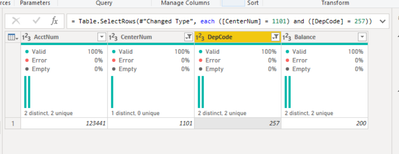
You were really close. If CenterNum and DepCode are formatted as text columns then you would include the quotation marks as you have in your script - otherwise you would not include the quotation marks, but you have a few extra digits. Instead of "1101" you have "1111001". The paranthesis in the snip below were automatically added by Power Query in desktop, but they are optional in this scenario.
= Table.SelectRows(#"Changed Type", each ([CenterNum] = 1101) and ([DepCode] = 257))
Wow, thanks so much for the help!
You're very welcome!
You were really close. If CenterNum and DepCode are formatted as text columns then you would include the quotation marks as you have in your script - otherwise you would not include the quotation marks, but you have a few extra digits. Instead of "1101" you have "1111001". The paranthesis in the snip below were automatically added by Power Query in desktop, but they are optional in this scenario.
= Table.SelectRows(#"Changed Type", each ([CenterNum] = 1101) and ([DepCode] = 257))
If you have recently started exploring Fabric, we'd love to hear how it's going. Your feedback can help with product improvements.
A new Power BI DataViz World Championship is coming this June! Don't miss out on submitting your entry.
Share feedback directly with Fabric product managers, participate in targeted research studies and influence the Fabric roadmap.
| User | Count |
|---|---|
| 6 | |
| 4 | |
| 3 | |
| 2 | |
| 2 |
| User | Count |
|---|---|
| 11 | |
| 10 | |
| 8 | |
| 7 | |
| 7 |