cancel
Showing results for 
Search instead for 
Did you mean: 

July 7 - July 17 | Round 2 of the Power BI Dataviz World Championships. Don't miss your chance! Learn more

Reply
Anonymous
Not applicable

Conditionally Filtering Out Rows based on 2 Parameters in w/ Power Query

Hello,
 

I have a table similar to the one attached below:

 
AcctNumCenterNumDepCodeBalance
1234541110122450
1234411101257200
49291804222257400
3801384048592224100


What I would like to do, using power query, is conditionally filter out (remove) rows where CenterNum = 1101 and DepCode = 257. I figured Table.SelectRows()  would work but it doesn't and the query just returns, this table is empty. The #"Expanded AccountLookup" ,in my formula below, is referencing the power query applied step before the one I am trying to create. I'm hoping to get some input on how to remove rows based on these two paramters.

= Table.SelectRows(#"Expanded AccountLookup", each [CenterNum] = "1111001" and [DepCode] = "257")

Thank you!

1 ACCEPTED SOLUTION
jennratten
Super User
Super User

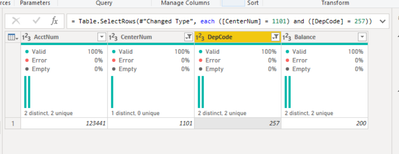
You were really close.  If CenterNum and DepCode are formatted as text columns then you would include the quotation marks as you have in your script - otherwise you would not include the quotation marks, but you have a few extra digits.  Instead of "1101" you have "1111001".  The paranthesis in the snip below were automatically added by Power Query in desktop, but they are optional in this scenario.

jennratten_0-1654054337213.png

= Table.SelectRows(#"Changed Type", each ([CenterNum] = 1101) and ([DepCode] = 257))


View solution in original post

3 REPLIES 3
Anonymous
Not applicable

Wow, thanks so much for the help!

You're very welcome!

jennratten
Super User
Super User

You were really close.  If CenterNum and DepCode are formatted as text columns then you would include the quotation marks as you have in your script - otherwise you would not include the quotation marks, but you have a few extra digits.  Instead of "1101" you have "1111001".  The paranthesis in the snip below were automatically added by Power Query in desktop, but they are optional in this scenario.

jennratten_0-1654054337213.png

= Table.SelectRows(#"Changed Type", each ([CenterNum] = 1101) and ([DepCode] = 257))


Helpful resources

Announcements
FabCon and SQLCon Barcelona 2026

FabCon & SQLCon – Barcelona 2026

Join us in Barcelona for FabCon and SQLCon, the Fabric, Power BI, SQL, and AI community event. Save €200 with code FABCMTY200.

July Power BI Update Carousel

Power BI Monthly Update - July 2026

Check out the July 2026 Power BI update to learn about new features.

60 days of Data Days Carousel

Data Days 2026

Join Data Days 2026: 60 days of free live/on-demand sessions, challenges, study groups, and certification opportunities.

Power BI DataViz World Championships carousel

Power BI DataViz World Championships - June 2026

A new Power BI DataViz World Championship is coming this June! Don't miss out on submitting your entry.

Top Solution Authors