This time we’re going bigger than ever. Fabric, Power BI, SQL, AI and more. We're covering it all. You won't want to miss it.
Learn moreLevel up your Power BI skills this month - build one visual each week and tell better stories with data! Get started
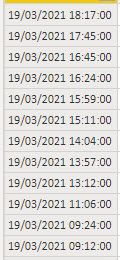
Hello. I have a problem, I want to calcute time diff in a column. And then I want to filter everything over 20 sec.
Solved! Go to Solution.
Hi @Bergh
Do you want to calculate the difference between current row with the next row? All rows are above 20 sec...or you want something different?
let
Source = Table.FromRows(Json.Document(Binary.Decompress(Binary.FromText("i45WMrTUNzDWNzIwMlQwtLAyNFeK1UEVNLcyMcUQNMMuaGSCIWhqZWqpFBsLAA==", BinaryEncoding.Base64), Compression.Deflate)), let _t = ((type nullable text) meta [Serialized.Text = true]) in type table [Column1 = _t]),
#"Changed Type" = Table.TransformColumnTypes(Source,{{"Column1", type datetime}}),
#"Added Index" = Table.AddIndexColumn(#"Changed Type", "Index", 0, 1, Int64.Type),
#"Added Custom" = Table.AddColumn(#"Added Index", "Custom", each [nextrow = try #"Added Index"{[Index]+1}[Column1] otherwise [Column1],
comp = ([Column1]-nextrow)> #duration(0,0,0,20)][comp])
in
#"Added Custom"
Hi @Bergh
Do you want to calculate the difference between current row with the next row? All rows are above 20 sec...or you want something different?
let
Source = Table.FromRows(Json.Document(Binary.Decompress(Binary.FromText("i45WMrTUNzDWNzIwMlQwtLAyNFeK1UEVNLcyMcUQNMMuaGSCIWhqZWqpFBsLAA==", BinaryEncoding.Base64), Compression.Deflate)), let _t = ((type nullable text) meta [Serialized.Text = true]) in type table [Column1 = _t]),
#"Changed Type" = Table.TransformColumnTypes(Source,{{"Column1", type datetime}}),
#"Added Index" = Table.AddIndexColumn(#"Changed Type", "Index", 0, 1, Int64.Type),
#"Added Custom" = Table.AddColumn(#"Added Index", "Custom", each [nextrow = try #"Added Index"{[Index]+1}[Column1] otherwise [Column1],
comp = ([Column1]-nextrow)> #duration(0,0,0,20)][comp])
in
#"Added Custom"
Thanks Vera_33 it works fine for me!!
Check out the April 2026 Power BI update to learn about new features.
Sign up to receive a private message when registration opens and key events begin.
If you have recently started exploring Fabric, we'd love to hear how it's going. Your feedback can help with product improvements.