Join us at FabCon Atlanta from March 16 - 20, 2026, for the ultimate Fabric, Power BI, AI and SQL community-led event. Save $200 with code FABCOMM.
Register now!Vote for your favorite vizzies from the Power BI Dataviz World Championship submissions. Vote now!
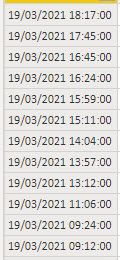
Hello. I have a problem, I want to calcute time diff in a column. And then I want to filter everything over 20 sec.
Solved! Go to Solution.
Hi @Bergh
Do you want to calculate the difference between current row with the next row? All rows are above 20 sec...or you want something different?
let
Source = Table.FromRows(Json.Document(Binary.Decompress(Binary.FromText("i45WMrTUNzDWNzIwMlQwtLAyNFeK1UEVNLcyMcUQNMMuaGSCIWhqZWqpFBsLAA==", BinaryEncoding.Base64), Compression.Deflate)), let _t = ((type nullable text) meta [Serialized.Text = true]) in type table [Column1 = _t]),
#"Changed Type" = Table.TransformColumnTypes(Source,{{"Column1", type datetime}}),
#"Added Index" = Table.AddIndexColumn(#"Changed Type", "Index", 0, 1, Int64.Type),
#"Added Custom" = Table.AddColumn(#"Added Index", "Custom", each [nextrow = try #"Added Index"{[Index]+1}[Column1] otherwise [Column1],
comp = ([Column1]-nextrow)> #duration(0,0,0,20)][comp])
in
#"Added Custom"
Hi @Bergh
Do you want to calculate the difference between current row with the next row? All rows are above 20 sec...or you want something different?
let
Source = Table.FromRows(Json.Document(Binary.Decompress(Binary.FromText("i45WMrTUNzDWNzIwMlQwtLAyNFeK1UEVNLcyMcUQNMMuaGSCIWhqZWqpFBsLAA==", BinaryEncoding.Base64), Compression.Deflate)), let _t = ((type nullable text) meta [Serialized.Text = true]) in type table [Column1 = _t]),
#"Changed Type" = Table.TransformColumnTypes(Source,{{"Column1", type datetime}}),
#"Added Index" = Table.AddIndexColumn(#"Changed Type", "Index", 0, 1, Int64.Type),
#"Added Custom" = Table.AddColumn(#"Added Index", "Custom", each [nextrow = try #"Added Index"{[Index]+1}[Column1] otherwise [Column1],
comp = ([Column1]-nextrow)> #duration(0,0,0,20)][comp])
in
#"Added Custom"
Thanks Vera_33 it works fine for me!!
Vote for your favorite vizzies from the Power BI World Championship submissions!
If you love stickers, then you will definitely want to check out our Community Sticker Challenge!
Check out the January 2026 Power BI update to learn about new features.
| User | Count |
|---|---|
| 13 | |
| 11 | |
| 8 | |
| 7 | |
| 6 |