Don't miss your chance to take exam DP-600 or DP-700 on us!
Request nowLearn from the best! Meet the four finalists headed to the FINALS of the Power BI Dataviz World Championships! Register now
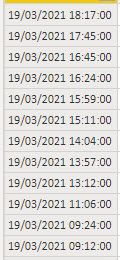
Hello. I have a problem, I want to calcute time diff in a column. And then I want to filter everything over 20 sec.
Solved! Go to Solution.
Hi @Bergh
Do you want to calculate the difference between current row with the next row? All rows are above 20 sec...or you want something different?
let
Source = Table.FromRows(Json.Document(Binary.Decompress(Binary.FromText("i45WMrTUNzDWNzIwMlQwtLAyNFeK1UEVNLcyMcUQNMMuaGSCIWhqZWqpFBsLAA==", BinaryEncoding.Base64), Compression.Deflate)), let _t = ((type nullable text) meta [Serialized.Text = true]) in type table [Column1 = _t]),
#"Changed Type" = Table.TransformColumnTypes(Source,{{"Column1", type datetime}}),
#"Added Index" = Table.AddIndexColumn(#"Changed Type", "Index", 0, 1, Int64.Type),
#"Added Custom" = Table.AddColumn(#"Added Index", "Custom", each [nextrow = try #"Added Index"{[Index]+1}[Column1] otherwise [Column1],
comp = ([Column1]-nextrow)> #duration(0,0,0,20)][comp])
in
#"Added Custom"
Hi @Bergh
Do you want to calculate the difference between current row with the next row? All rows are above 20 sec...or you want something different?
let
Source = Table.FromRows(Json.Document(Binary.Decompress(Binary.FromText("i45WMrTUNzDWNzIwMlQwtLAyNFeK1UEVNLcyMcUQNMMuaGSCIWhqZWqpFBsLAA==", BinaryEncoding.Base64), Compression.Deflate)), let _t = ((type nullable text) meta [Serialized.Text = true]) in type table [Column1 = _t]),
#"Changed Type" = Table.TransformColumnTypes(Source,{{"Column1", type datetime}}),
#"Added Index" = Table.AddIndexColumn(#"Changed Type", "Index", 0, 1, Int64.Type),
#"Added Custom" = Table.AddColumn(#"Added Index", "Custom", each [nextrow = try #"Added Index"{[Index]+1}[Column1] otherwise [Column1],
comp = ([Column1]-nextrow)> #duration(0,0,0,20)][comp])
in
#"Added Custom"
Thanks Vera_33 it works fine for me!!
Share feedback directly with Fabric product managers, participate in targeted research studies and influence the Fabric roadmap.
Check out the February 2026 Power BI update to learn about new features.