cancel
Showing results for 
Search instead for 
Did you mean: 

July 7 - July 17 | Round 2 of the Power BI Dataviz World Championships. Don't miss your chance! Learn more

Reply
Anonymous
Not applicable

ADDING ROW

Hello Everybody

if i have the  tab a and tab b and i want ot create a table c like below, how i have to do?


 tab a   tab b  tab c
ABC ABF ABCF
X1a X4b X5ab
Y2b Y5c Y7bc
Z3c Z6f Z9cf
    T8h T8 h
    G9j G9 j
3 ACCEPTED SOLUTIONS
edhans
Community Champion
Community Champion

Go to table A @Anonymous 

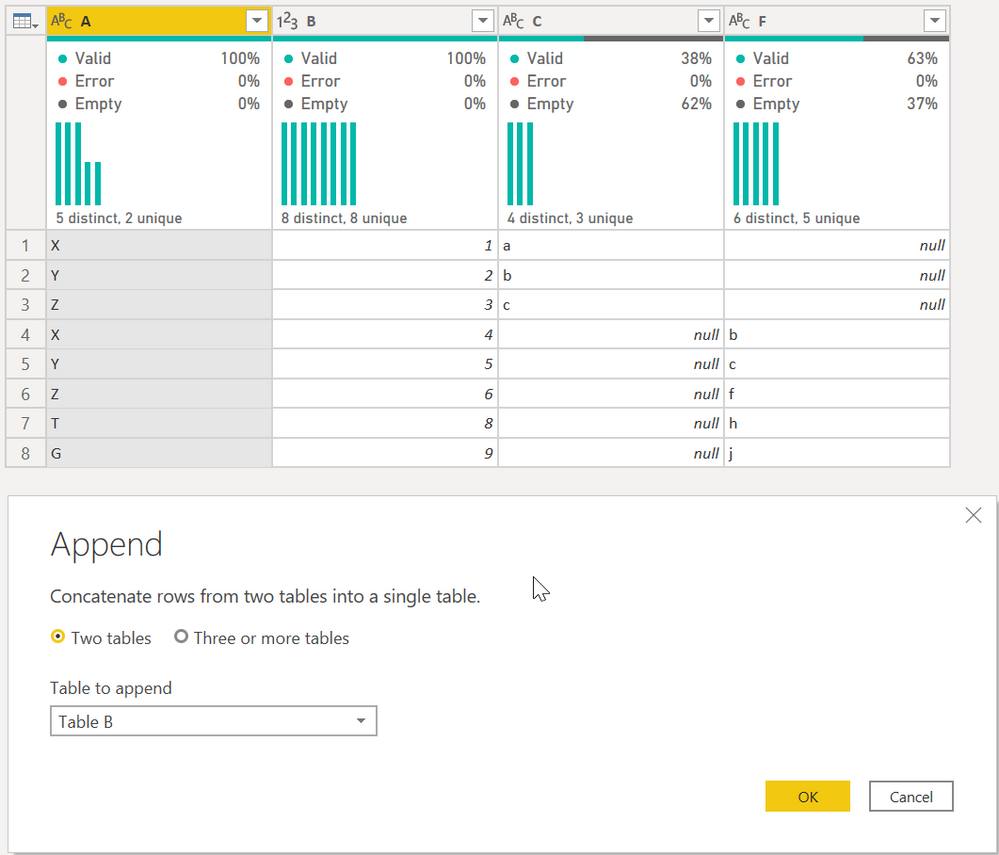
First, select Append Queries as shown. It will give you this table:


edhans_1-1602787052780.png

Then select column A and then Group By on the ribbon. Select the Advanced button, and do the following:

edhans_2-1602787109731.png


That is a very specific sequence that only works when data looks like that. I am not sure how adaptable that will be to a much larger and more complex data set.


Did I answer your question? Mark my post as a solution!
Did my answers help arrive at a solution? Give it a kudos by clicking the Thumbs Up!

DAX is for Analysis. Power Query is for Data Modeling


Proud to be a Super User!

MCSA: BI Reporting

View solution in original post

ziying35
Impactful Individual

Hi, @Anonymous 

Try this:

// tab_a
let
    Source = Excel.CurrentWorkbook(){[Name="tab_a"]}[Content],
    trsp = Table.Transpose(Table.DemoteHeaders(Source))
in
    trsp

// tab_b
let
    Source = Excel.CurrentWorkbook(){[Name="tab_b"]}[Content],
    trsp = Table.Transpose(Table.DemoteHeaders(Source))
in
    trsp

// output
let
    Source = Table.Combine({tab_a, tab_b}),
        fx = (tbl)=>
          let
             lists = Table.ToList(tbl, each List.Skip(_)),
             fnChkIsNum = (lists)=> 
                   List.AllTrue(
                       List.Transform(
                             lists,
                             (slist)=>List.AllTrue(List.Transform(slist, each Value.Is(_??1, type number)))
                       )
                   ),
             ChkIsNum = fnChkIsNum(lists),
             trans = if ChkIsNum = true then List.Transform(List.Zip(lists), List.Sum) 
                     else List.Transform(List.Zip(lists), each List.Distinct(List.RemoveNulls(_)){0}?)
          in trans,
    group = Table.Group(Source,"Column1",{"t", each {[Column1]{0}}&fx(_)}),
    result = Table.PromoteHeaders(Table.FromColumns(group[t]))
in
    result

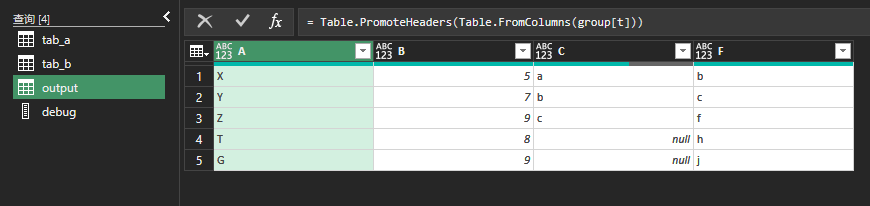
235.png

View solution in original post

shaowu459
Resolver II
Resolver II

Upload two tables into Power Query Editor, and paste below code in a blank query.

let
    tbl = tab_a&tab_b,
    Source = Table.SplitColumn(Table.Group(tbl,"A",{"n",each List.Transform(List.Skip(Table.ToColumns(_)),(x)=>try Text.Combine(x) otherwise List.Sum(x))}),"n",each _,List.Skip(Table.ColumnNames(tbl)))
in
    Source

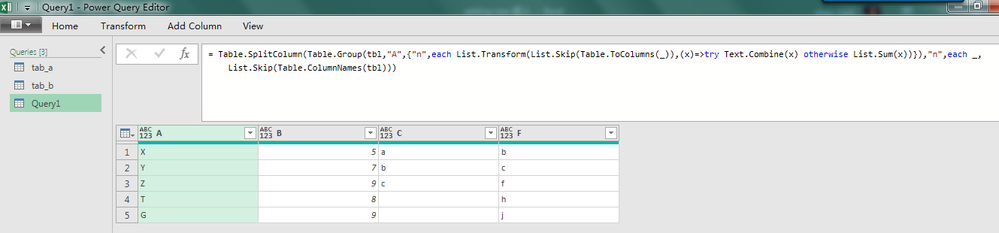
1.png 

View solution in original post

3 REPLIES 3
shaowu459
Resolver II
Resolver II

Upload two tables into Power Query Editor, and paste below code in a blank query.

let
    tbl = tab_a&tab_b,
    Source = Table.SplitColumn(Table.Group(tbl,"A",{"n",each List.Transform(List.Skip(Table.ToColumns(_)),(x)=>try Text.Combine(x) otherwise List.Sum(x))}),"n",each _,List.Skip(Table.ColumnNames(tbl)))
in
    Source

1.png 

ziying35
Impactful Individual

Hi, @Anonymous 

Try this:

// tab_a
let
    Source = Excel.CurrentWorkbook(){[Name="tab_a"]}[Content],
    trsp = Table.Transpose(Table.DemoteHeaders(Source))
in
    trsp

// tab_b
let
    Source = Excel.CurrentWorkbook(){[Name="tab_b"]}[Content],
    trsp = Table.Transpose(Table.DemoteHeaders(Source))
in
    trsp

// output
let
    Source = Table.Combine({tab_a, tab_b}),
        fx = (tbl)=>
          let
             lists = Table.ToList(tbl, each List.Skip(_)),
             fnChkIsNum = (lists)=> 
                   List.AllTrue(
                       List.Transform(
                             lists,
                             (slist)=>List.AllTrue(List.Transform(slist, each Value.Is(_??1, type number)))
                       )
                   ),
             ChkIsNum = fnChkIsNum(lists),
             trans = if ChkIsNum = true then List.Transform(List.Zip(lists), List.Sum) 
                     else List.Transform(List.Zip(lists), each List.Distinct(List.RemoveNulls(_)){0}?)
          in trans,
    group = Table.Group(Source,"Column1",{"t", each {[Column1]{0}}&fx(_)}),
    result = Table.PromoteHeaders(Table.FromColumns(group[t]))
in
    result

235.png

edhans
Community Champion
Community Champion

Go to table A @Anonymous 

First, select Append Queries as shown. It will give you this table:


edhans_1-1602787052780.png

Then select column A and then Group By on the ribbon. Select the Advanced button, and do the following:

edhans_2-1602787109731.png


That is a very specific sequence that only works when data looks like that. I am not sure how adaptable that will be to a much larger and more complex data set.


Did I answer your question? Mark my post as a solution!
Did my answers help arrive at a solution? Give it a kudos by clicking the Thumbs Up!

DAX is for Analysis. Power Query is for Data Modeling


Proud to be a Super User!

MCSA: BI Reporting

Helpful resources

Announcements
FabCon and SQLCon Barcelona 2026

FabCon & SQLCon – Barcelona 2026

Join us in Barcelona for FabCon and SQLCon, the Fabric, Power BI, SQL, and AI community event. Save €200 with code FABCMTY200.

60 days of Data Days Carousel

Data Days 2026

Join Data Days 2026: 60 days of free live/on-demand sessions, challenges, study groups, and certification opportunities.

Power BI DataViz World Championships carousel

Power BI DataViz World Championships - June 2026

A new Power BI DataViz World Championship is coming this June! Don't miss out on submitting your entry.

Top Solution Authors