cancel
Showing results for 
Search instead for 
Did you mean: 

The Power BI Data Visualization World Championships is back! Get ahead of the game and start preparing now! Learn more

Reply
Anonymous
Not applicable

ADDING ROW

Hello Everybody

if i have the  tab a and tab b and i want ot create a table c like below, how i have to do?


 tab a   tab b  tab c
ABC ABF ABCF
X1a X4b X5ab
Y2b Y5c Y7bc
Z3c Z6f Z9cf
    T8h T8 h
    G9j G9 j
3 ACCEPTED SOLUTIONS
edhans
Super User
Super User

Go to table A @Anonymous 

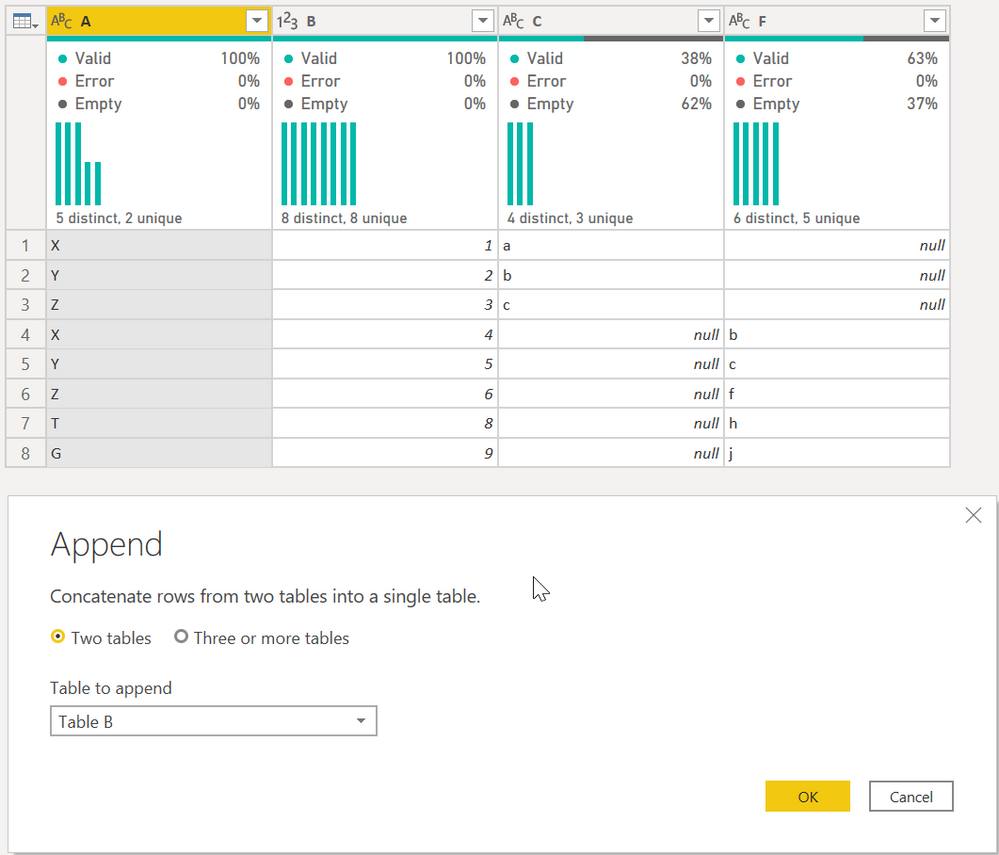
First, select Append Queries as shown. It will give you this table:


edhans_1-1602787052780.png

Then select column A and then Group By on the ribbon. Select the Advanced button, and do the following:

edhans_2-1602787109731.png


That is a very specific sequence that only works when data looks like that. I am not sure how adaptable that will be to a much larger and more complex data set.


Did I answer your question? Mark my post as a solution!
Did my answers help arrive at a solution? Give it a kudos by clicking the Thumbs Up!

DAX is for Analysis. Power Query is for Data Modeling


Proud to be a Super User!

MCSA: BI Reporting

View solution in original post

ziying35
Impactful Individual

Hi, @Anonymous 

Try this:

// tab_a
let
    Source = Excel.CurrentWorkbook(){[Name="tab_a"]}[Content],
    trsp = Table.Transpose(Table.DemoteHeaders(Source))
in
    trsp

// tab_b
let
    Source = Excel.CurrentWorkbook(){[Name="tab_b"]}[Content],
    trsp = Table.Transpose(Table.DemoteHeaders(Source))
in
    trsp

// output
let
    Source = Table.Combine({tab_a, tab_b}),
        fx = (tbl)=>
          let
             lists = Table.ToList(tbl, each List.Skip(_)),
             fnChkIsNum = (lists)=> 
                   List.AllTrue(
                       List.Transform(
                             lists,
                             (slist)=>List.AllTrue(List.Transform(slist, each Value.Is(_??1, type number)))
                       )
                   ),
             ChkIsNum = fnChkIsNum(lists),
             trans = if ChkIsNum = true then List.Transform(List.Zip(lists), List.Sum) 
                     else List.Transform(List.Zip(lists), each List.Distinct(List.RemoveNulls(_)){0}?)
          in trans,
    group = Table.Group(Source,"Column1",{"t", each {[Column1]{0}}&fx(_)}),
    result = Table.PromoteHeaders(Table.FromColumns(group[t]))
in
    result

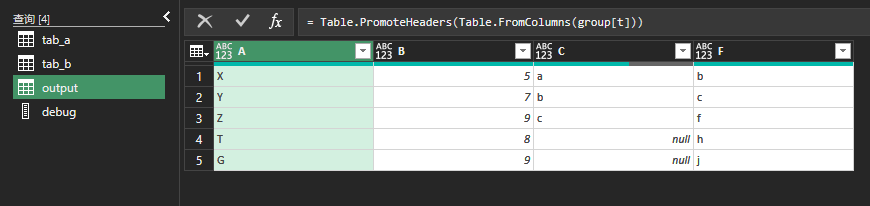
235.png

View solution in original post

shaowu459
Resolver II
Resolver II

Upload two tables into Power Query Editor, and paste below code in a blank query.

let
    tbl = tab_a&tab_b,
    Source = Table.SplitColumn(Table.Group(tbl,"A",{"n",each List.Transform(List.Skip(Table.ToColumns(_)),(x)=>try Text.Combine(x) otherwise List.Sum(x))}),"n",each _,List.Skip(Table.ColumnNames(tbl)))
in
    Source

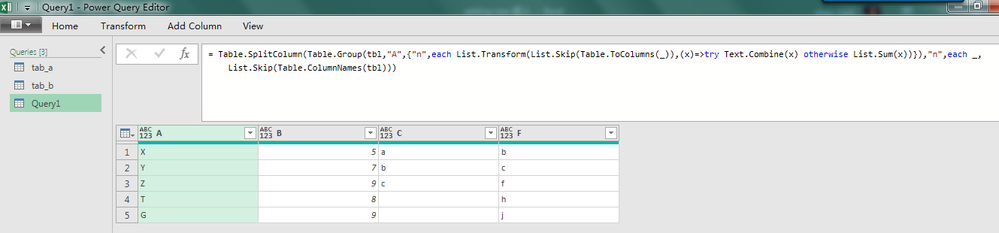
1.png 

View solution in original post

3 REPLIES 3
shaowu459
Resolver II
Resolver II

Upload two tables into Power Query Editor, and paste below code in a blank query.

let
    tbl = tab_a&tab_b,
    Source = Table.SplitColumn(Table.Group(tbl,"A",{"n",each List.Transform(List.Skip(Table.ToColumns(_)),(x)=>try Text.Combine(x) otherwise List.Sum(x))}),"n",each _,List.Skip(Table.ColumnNames(tbl)))
in
    Source

1.png 

ziying35
Impactful Individual

Hi, @Anonymous 

Try this:

// tab_a
let
    Source = Excel.CurrentWorkbook(){[Name="tab_a"]}[Content],
    trsp = Table.Transpose(Table.DemoteHeaders(Source))
in
    trsp

// tab_b
let
    Source = Excel.CurrentWorkbook(){[Name="tab_b"]}[Content],
    trsp = Table.Transpose(Table.DemoteHeaders(Source))
in
    trsp

// output
let
    Source = Table.Combine({tab_a, tab_b}),
        fx = (tbl)=>
          let
             lists = Table.ToList(tbl, each List.Skip(_)),
             fnChkIsNum = (lists)=> 
                   List.AllTrue(
                       List.Transform(
                             lists,
                             (slist)=>List.AllTrue(List.Transform(slist, each Value.Is(_??1, type number)))
                       )
                   ),
             ChkIsNum = fnChkIsNum(lists),
             trans = if ChkIsNum = true then List.Transform(List.Zip(lists), List.Sum) 
                     else List.Transform(List.Zip(lists), each List.Distinct(List.RemoveNulls(_)){0}?)
          in trans,
    group = Table.Group(Source,"Column1",{"t", each {[Column1]{0}}&fx(_)}),
    result = Table.PromoteHeaders(Table.FromColumns(group[t]))
in
    result

235.png

edhans
Super User
Super User

Go to table A @Anonymous 

First, select Append Queries as shown. It will give you this table:


edhans_1-1602787052780.png

Then select column A and then Group By on the ribbon. Select the Advanced button, and do the following:

edhans_2-1602787109731.png


That is a very specific sequence that only works when data looks like that. I am not sure how adaptable that will be to a much larger and more complex data set.


Did I answer your question? Mark my post as a solution!
Did my answers help arrive at a solution? Give it a kudos by clicking the Thumbs Up!

DAX is for Analysis. Power Query is for Data Modeling


Proud to be a Super User!

MCSA: BI Reporting

Helpful resources

Announcements
Power BI DataViz World Championships

Power BI Dataviz World Championships

The Power BI Data Visualization World Championships is back! Get ahead of the game and start preparing now!

December 2025 Power BI Update Carousel

Power BI Monthly Update - December 2025

Check out the December 2025 Power BI Holiday Recap!

FabCon Atlanta 2026 carousel

FabCon Atlanta 2026

Join us at FabCon Atlanta, March 16-20, for the ultimate Fabric, Power BI, AI and SQL community-led event. Save $200 with code FABCOMM.

Top Solution Authors