Get certified for free when you join Fabric Data Days 2026 and dive into Fabric, Power BI, SQL, AI, and other essential data skills.
Join nowJuly 7 - July 17 | Round 2 of the Power BI Dataviz World Championships. Don't miss your chance! Learn more
Hi all,
When I embed the URL into my JavaFX app to load in a WebView, I see the report loading part but then it is just all white. Every other webpage shows fine. Does anyone know why my reports are not showing, while when I enter the URL in the browser directly everything shows up fine.
(link: https://app.powerbi.com/view?r=eyJrIjoiMzdiNGIzOWMtOGFiMi00YTc0LWFhYmYtZjcyN2E3YzljYTY1IiwidCI6IjQzY...)
My code :
WebView webView = new WebView();
WebEngine webEngine = webView.getEngine();
webEngine.load("https://app.powerbi.com/view?r=eyJrIjoiMzdiNGIzOWMtOGFiMi00YTc0LWFhYmYtZjcyN2E3YzljYTY1IiwidCI6IjQzY2Q3MWNlLTBjODYtNGMxZi05NTc1LTBlMzg4YWEwZDY4YiIsImMiOjh9");Thanks in advance
Solved! Go to Solution.
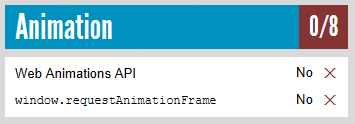
I've had a test. Based on my research, it seems to be not supported in the JavaFX embedded browser. See Supported browsers for Power BI.
webEngine.load("http://html5test.com/");
I'm not familiar with JavaFX. You may check if it is affected by HTTPS.
Thanks for your reply, sorry what do you mean by affected by https?
I mean have you tried other URLs that start with https, not http?
Every other URL works fine and displays properly, just except for the content of the report.
I've had a test. Based on my research, it seems to be not supported in the JavaFX embedded browser. See Supported browsers for Power BI.
webEngine.load("http://html5test.com/");
Join us in Barcelona for FabCon and SQLCon, the Fabric, Power BI, SQL, and AI community event. Save €200 with code FABCMTY200.
Join Fabric Data Days 2026: 60 days of free live/on-demand sessions, challenges, study groups, and certification opportunities.