This is best Fabric, Power BI, SQL and AI community event. How do we know? The last event sold out! Save €200 with code FABCMTY200.
Register nowThe Fabric community is upgrading! Read all of the details including the timeline and what you can expect. Learn more
Hi all,
When I embed the URL into my JavaFX app to load in a WebView, I see the report loading part but then it is just all white. Every other webpage shows fine. Does anyone know why my reports are not showing, while when I enter the URL in the browser directly everything shows up fine.
(link: https://app.powerbi.com/view?r=eyJrIjoiMzdiNGIzOWMtOGFiMi00YTc0LWFhYmYtZjcyN2E3YzljYTY1IiwidCI6IjQzY...)
My code :
WebView webView = new WebView();
WebEngine webEngine = webView.getEngine();
webEngine.load("https://app.powerbi.com/view?r=eyJrIjoiMzdiNGIzOWMtOGFiMi00YTc0LWFhYmYtZjcyN2E3YzljYTY1IiwidCI6IjQzY2Q3MWNlLTBjODYtNGMxZi05NTc1LTBlMzg4YWEwZDY4YiIsImMiOjh9");Thanks in advance
Solved! Go to Solution.
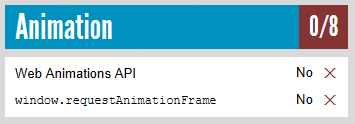
I've had a test. Based on my research, it seems to be not supported in the JavaFX embedded browser. See Supported browsers for Power BI.
webEngine.load("http://html5test.com/");
I'm not familiar with JavaFX. You may check if it is affected by HTTPS.
Thanks for your reply, sorry what do you mean by affected by https?
I mean have you tried other URLs that start with https, not http?
Every other URL works fine and displays properly, just except for the content of the report.
I've had a test. Based on my research, it seems to be not supported in the JavaFX embedded browser. See Supported browsers for Power BI.
webEngine.load("http://html5test.com/");
Join us in Barcelona for FabCon and SQLCon, the Fabric, Power BI, SQL, and AI community event. Save €200 with code FABCMTY200.
| User | Count |
|---|---|
| 2 | |
| 1 | |
| 1 | |
| 1 | |
| 1 |
| User | Count |
|---|---|
| 4 | |
| 2 | |
| 1 | |
| 1 | |
| 1 |